Generating professional AI video previously required an exhausting amount of trial and error. If you’re the kind of person who used early models, you know the drill: you’d type a basic request, desperately append a phrase like “cinematic lighting,” and cross your fingers, just waiting to see if the model could interpret your spatial requirements without distorting the perspective or melting the entire background during a simple pan. I accepted those limitations back then, mostly because the core technology was still finding its architectural footing.
Today, though, the landscape demands absolute spatial control. With the releases of Google Veo 3.1 and OpenAI Sora 2 Pro, these engines no longer just paint moving pixels. They actually simulate 3D physics, calculate depth of field, and replicate precise optical lens distortions. That’s where things get interesting, because underneath the hood, they process your text instructions entirely differently.
Here’s the catch: if you want a flawless tracking shot, you absolutely cannot feed both models the exact same prompt and expect identical cinematic execution. You have to understand how each engine interprets three-dimensional space. I decided to peel back the hype and break down the exact mechanics, technical vocabulary, and prompt formulas required to dictate camera angles and movement paths in the two most powerful text-to-video engines currently available.
Unsurprisingly, understanding the underlying architecture of Veo 3.1 and Sora 2 Pro is the absolute key to commanding those exact camera movements.
Table of Contents
- Google Veo 3.1 vs Sora 2 Pro: Feature Comparison
- The 5-Part AI Video Prompt Formula
- Structuring the Perfect Veo 3.1 Camera Prompt
- OpenAI Sora 2 Pro: The 3D Physics Simulator
- How Camera Angles Affect AI Audio Generation
- Head-to-Head: Executing Complex Cinematography
- Mastering the Technical Vocabulary
- Frequently Asked Questions
Google Veo 3.1 vs Sora 2 Pro: Feature Comparison
Before I dive into advanced prompt engineering, it’s crucial to understand the core architectural differences between the 2026 iterations of these models. Veo 3.1 and Sora 2 Pro handle duration, audio integration, and physics simulation in fundamentally different ways.
I noticed right away that Veo 3.1 leans heavily into traditional filmmaking parameters. It utilizes training data meticulously tagged with precise focal lengths, lighting setups, and camera rigs. Sora 2 Pro, conversely, simulates an entire 3D environment within its latent space first. It calculates light bounces, mass, and fluid dynamics long before it even decides where to place the virtual camera.
| Feature | Google Veo 3.1 | OpenAI Sora 2 Pro |
|---|---|---|
| Core Architecture | Optical emulation and 2D temporal coherence. | True 3D latent space physics simulation. |
| Video Duration | 8-second base, extendable up to 2 minutes with strong coherence. | Native long-form generation up to 3 minutes seamlessly. |
| Audio Integration | Native diegetic audio, excellent dialogue lip-syncing. | Advanced spatial audio synchronized directly to physics impacts. |
| Camera Control Logic | Responds to strict Hollywood cinematography terms (f-stops, lenses). | Responds to spatial trajectory, anchors, and physics constraints. |
Which brings us to a harsh reality: to master either tool, you simply cannot rely on generic aesthetic keywords anymore. You must build your prompts structurally. While image generation models might allow for looser phrasing and happy accidents, video generation demands absolute rigidity. You can explore how these structural constraints parallel other models in my guide on 7 Text-to-Image Prompt Formulas.
The 5-Part AI Video Prompt Formula
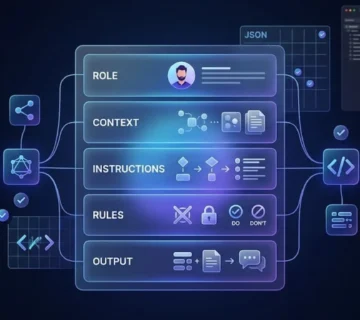
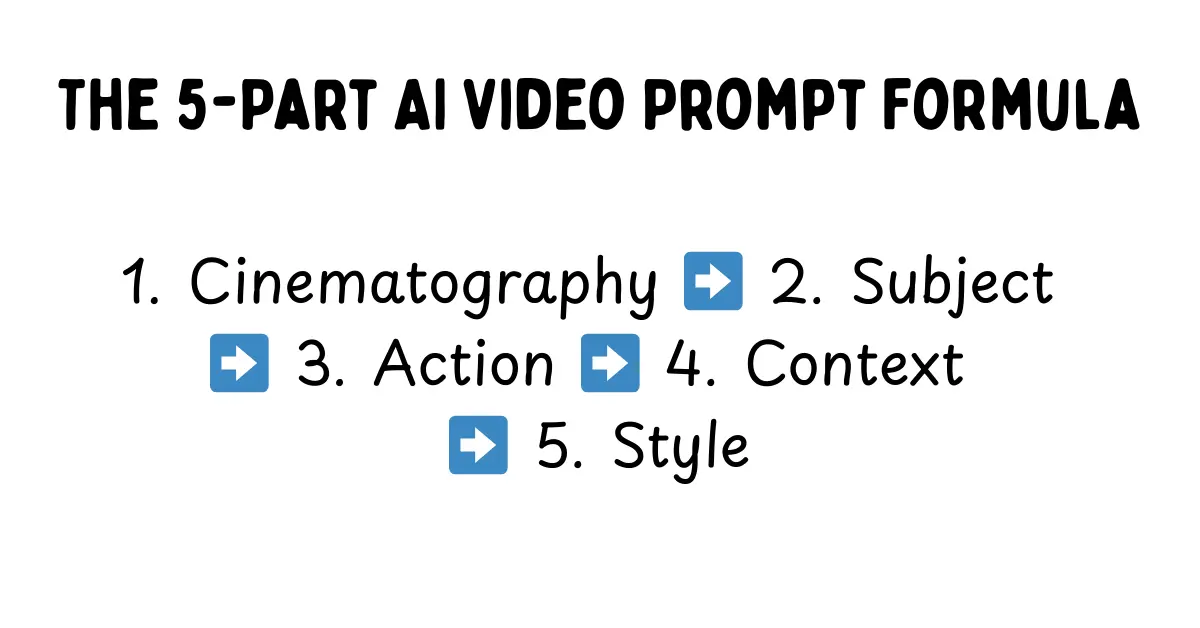
If you want to command these engines effectively, you need a repeatable architectural framework. I found that the industry standard for achieving actual temporal consistency and spatial accuracy is the 5-Part Prompt Formula. This structure essentially forces the AI to establish the camera hardware and environmental constraints before it even begins rendering the fluid action.
Here’s what you can do to ruin a shot: bury your camera instructions at the very end of a paragraph. The AI’s attention mechanism will immediately prioritize the subject and inevitably default to a generic medium shot. Front-loading the technical data ensures that the entire generation is actually viewed through your desired lens.
[1. Cinematography] + [2. Subject] + [3. Action] + [4. Context] + [5. Style & Ambiance]- Cinematography: Camera mount, movement path, lens type, and focal length.
- Subject: A highly detailed description of the primary focus, including wardrobe and textures.
- Action: What the subject is actively doing, dictating the kinetic energy of the shot.
- Context: The background environment, the time of day, and the specific lighting setup.
- Style & Ambiance: Film stock, color grading, atmospheric elements (fog, rain, dust), and the overall mood.
By rigidly enforcing this structure, I noticed you eliminate the ambiguity that causes AI video to inevitably morph or hallucinate. The engine knows exactly where the camera is stationed before the subject even twitches.
Front-loading your cinematography instructions forces the AI to securely lock the camera rig before rendering the environment.
Structuring the Perfect Veo 3.1 Camera Prompt
It’s clear that Google built Veo 3.1 to act as a digital Director of Photography. I tested this thoroughly, and its neural network responds exceptionally well to rigid, industry-standard cinematography terms. You do not just tell Veo to “move left”; you command a cinematic dolly track. You specify the aperture and the exact focal length like you’re actually on set.
I found that Veo 3.1 excels at maintaining temporal consistency during complex pans, mostly because it leverages its massive dataset to predict off-screen space effectively. This predictive capability is exactly what minimizes those awful morphing objects when you’re executing a 180-degree sweep across a crowded room.
[A low-angle tracking shot moving steadily backward just inches off the wet pavement][following a heavily armored riot police officer sprinting through thick green tear gas][shot on an Arri Alexa 65, 35mm spherical lens, f/2.8][heavy motion blur on the foreground debris, shallow depth of field isolating the officer's visor]Notice the mathematical exactness of this prompt. I am mandating the physical relationship between the lens and the subject. By specifying a 35mm spherical lens and an f/2.8 aperture, I am instructing Veo exactly how much of the background should be thrown out of focus. If you struggle to translate your vision into this kind of technical filmmaking syntax, you can bypass the guesswork entirely. Running your base concept through a specialized Google Veo 3 Prompt Generator automatically formats your ideas into the precise optical language the Google engine naturally favors.
OpenAI Sora 2 Pro: The 3D Physics Simulator
Sora 2 Pro, on the other hand, operates on a completely different philosophy. It acts far less like a camera recording a 2D scene and much more like a massive physics engine. It literally simulates a 3D world in its latent space, calculates the gravity and light bounces, and then simply drops a virtual camera right into that pre-rendered environment.
That gives Sora incredible power, particularly for kinetic action, but it also makes the model notoriously stubborn. I quickly learned that if you ask for a camera move that breaks the physics of the environment—such as clipping through a solid wall—Sora will often ignore the camera prompt entirely just to preserve its world integrity.
To actually control Sora, you must anchor your camera movements to the environment or the subjects within it. You have to dictate the speed, the spatial relationship, and the trajectory. I noticed that with OpenAI’s latest architecture, the temporal consistency holds up beautifully even during incredibly aggressive Z-axis movements (moving forward or backward into the depth of the scene).
[A high-speed FPV drone shot plunging vertically down the side of a gleaming glass skyscraper][pulling up sharply just before hitting the chaotic, yellow-cab-filled street below][following the trajectory of a falling red silk scarf][wide-angle distortion, hyper-realistic motion physics, afternoon sunlight reflecting off the glass]When I tested this, the prompt proved highly effective because it gives Sora a physical path (plunging down a skyscraper) and a distinct subject to track (the falling scarf). The camera isn’t just floating vaguely in space; it has a concrete physical anchor in the generated reality. To generate these physics-bound scenarios without triggering endless rendering errors, leveraging an OpenAI Sora 2 Prompt Generator can really help lock in the necessary environmental anchors before execution.
How Camera Angles Affect AI Audio Generation
A major leap in 2026 AI video generation is the introduction of native, synchronized audio. I found it fascinating that both Veo 3.1 and Sora 2 Pro now generate diegetic sound directly tied to your camera prompt. This essentially means your visual prompt is simultaneously acting as your audio mixing prompt.
If you prompt an “Extreme Close-Up (ECU) of two people whispering,” I noticed the models will generate intimate, low-volume audio with minimal spatial reverb. However, if you change that exact same scene to an “Ultra-wide drone shot from 500 feet away,” the audio engine automatically applies distance muffling, heavy wind noise, and expansive spatial reverb, successfully pushing the whispering down in the mix.
Understanding this spatial audio mapping is absolutely critical. When you’re writing your prompts, you must consider how the focal length actively impacts the virtual microphone placement. A “macro lens” prompt inherently instructs the AI to generate close-proximity Foley sound, beautifully picking up the rustle of clothing or the subtle scrape of a coffee cup on a table. Conversely, an establishing shot will prioritize ambient environmental noise over those specific subject actions.
Head-to-Head: Executing Complex Cinematography
So, how do these two titans actually handle the most notoriously difficult camera moves in the film industry? I decided to test them head-to-head. Let’s analyze three specific setups and explore the exact prompt adjustments required for each engine.
1. The Parallax Orbit (The “Matrix” Shot)
An orbit shot requires the camera to circle a stationary or slow-moving subject while the background shifts rapidly behind them. If you’ve tried this before, you know it’s an absolute nightmare for older AI models because it forces the engine to constantly generate new background data while somehow keeping the central subject structurally consistent from 360 different angles.
Veo 3.1’s Execution: I found that Veo handles this maneuver flawlessly—provided you keep the orbit speed slow. It uses its vast understanding of human anatomy to keep the subject from warping. That said, if you push the speed too high, the background tends to lose high-frequency detail, disappointingly blurring into a generic wash of color just to save processing power.
Sora 2 Pro’s Execution: Because Sora simulates the entire room in its latent memory first, an orbit shot here looks incredibly grounded. The background maintains total structural integrity and lighting consistency. To execute this perfectly in Sora, I learned you must ensure you prompt for a specific focal point: [360-degree orbit shot tracking around the subject's face, maintaining strict eye-line match].
2. The Rack Focus (Depth of Field Shift)
A rack focus shifts the viewer’s attention by changing the focal point from a foreground object to a background object without physically moving the camera. It is a purely optical technique, which makes it a perfect test.
Veo 3.1’s Execution: Unsurprisingly, optical precision is Veo’s strongest asset. Veo 3.1 understands the concept of a focal plane perfectly. I explicitly prompted it to [rack focus from the smoking gun barrel in the foreground to the terrified face in the background], and it executed the optical blur with absolute mathematical precision.
Sora 2 Pro’s Execution: Sora, on the other hand, inherently struggles with depth of field manipulation. Because it desperately wants everything to exist physically in the space, it often defaults to deep focus. Achieving a cinematic rack focus in Sora requires aggressive prompt engineering. You must physically force the optical limitation with a prompt like this: [Extreme macro foreground, heavy bokeh, sudden and deliberate focus shift to the background subject].
3. The Handheld “Shaky Cam”
Sometimes you don’t want smooth, perfectly stabilized footage. You want chaotic, documentary-style realism that immerses the viewer right into the action.
Veo 3.1’s Execution: Veo tends to interpret “handheld camera” as a slight, rhythmic bob. During my testing, it occasionally looked artificial, resembling a digital effect slapped on in post-production rather than true camera weight. To achieve authentic grit, you really must prompt heavily for the operator’s physical state: [Violent camera shake, operator running, uneven footsteps, unsteadicam].
Sora 2 Pro’s Execution: Sora naturally understands kinetic energy and mass. When I prompted a chaotic scene—like a riot or a collapsing building—and added [bodycam perspective] or [smartphone footage], Sora automatically degraded the stability of the virtual camera. The resulting motion blur, shutter roll, and physical bouncing felt incredibly authentic and genuinely visceral.
The rack focus is a staple of dramatic cinema, and Veo 3.1 clearly handles this optical shift seamlessly due to its extensive training on Hollywood datasets.
Mastering the Technical Vocabulary
To extract the best results from either AI video system, you simply must upgrade your prompt vocabulary. It’s time to throw away vague terms like “epic angle,” “cool zoom,” or “cinematic lighting.” These AI engines are trained on professional filmmaking data, meaning you must speak to them like a grip, a gaffer, and a director.
Shot Sizes
- Extreme Close-Up (ECU): Isolates a specific detail, like an eye or a ring on a finger. Excellent for capturing intense emotion.
- Medium Shot (MS): Frames the subject from the waist up. This is the absolute standard for dialogue scenes.
- Cowboy Shot: Frames the subject from mid-thigh up. I use this to show body language and environment simultaneously.
- Full Body Wide / Establishing Shot: Sets the geography of the scene. You want to keep camera movement minimal here to allow the AI to render the vast environment clearly.
Camera Mounts & Movement
- Steadicam Tracking: Smooth, floating movement smoothly following a subject through an environment.
- Crane / Jib Shot: Sweeping vertical movement, often starting low and ending high to dramatically reveal a landscape.
- Russian Arm: High-speed, vehicle-mounted tracking shot. This is absolutely essential for car chases.
- FPV Drone: High-velocity, agile movement that ignores traditional gravity, making it perfect for plunging down buildings or flying through tight spaces.
Lenses and Optics
- 12mm Ultra-Wide: Distorts the edges of the frame, making spaces feel massive and subjects feel slightly unnerving.
- 50mm Prime: Closely mimics the human eye. It provides a natural, grounded perspective with moderate depth of field.
- 85mm Portrait Lens: Compresses the background and creates beautiful bokeh (blur), instantly making the shot look like a high-budget film.
- Anamorphic Squeeze: Generates widescreen cinematic aspect ratios with distinctive horizontal lens flares.
Mastering this vocabulary is the very foundation of high-level prompt engineering. Whether you are writing a Claude 4.5 system prompt to organize your workflow or generating a complex video script, I’ve learned that specificity is the only metric that truly matters.
Frequently Asked Questions
How do I stop AI video from morphing when the camera moves?
Morphing occurs when the AI entirely loses temporal consistency. To fix this, you have to use the 5-Part Prompt Formula to lock in the camera hardware first. Additionally, slowing down the requested camera movement (e.g., “slow, creeping dolly push”) gives the engine significantly more time to calculate the spatial geometry.
Which is better for photorealism, Veo 3.1 or Sora 2 Pro?
Both achieve stunning photorealism, but they do it in entirely different ways. Veo 3.1 excels at optical realism, perfectly mimicking specific camera lenses, film stocks, and lighting setups. Sora 2 Pro, however, excels at physical realism, ensuring that water splashes, cloth physics, and lighting bounces actually behave according to real-world physics.
Can I use camera prompts to control AI audio generation?
Yes, absolutely. Both models use your exact camera distance to generate diegetic sound. An “extreme close-up” will generate intimate, dry audio, while a “wide drone shot” will generate audio with heavy spatial reverb, wind noise, and distance muffling.
Why does Sora ignore my camera movement prompts?
Sora operates strictly as a 3D physics simulator. If your camera movement breaks the physical laws of the environment it just generated (like passing right through a solid object without explicit instruction), Sora will almost always prioritize the environment’s structural integrity and completely ignore your camera command.
What is the best focal length for AI portrait videos?
An 85mm lens is generally considered the best focal length for cinematic portraits. In your prompt, specifying “shot on an 85mm lens, f/1.8” will ensure the AI compresses the background beautifully and throws distracting elements completely out of focus, much like my recommended Midjourney Prompts for Cinematic Realism.
Conclusion
At the end of the day, both Veo 3.1 and Sora 2 Pro offer staggering capabilities, but they require entirely different mindsets to master. Veo is your meticulous digital cinematographer, perfect for controlled optical precision, while Sora is your wild 3D physics playground, unmatched for visceral kinetic energy. Neither is perfect—Veo still relies on 2D prediction, and Sora will stubbornly fight your camera moves to protect its simulated physics. But if you’re willing to learn their specific mechanical languages, you’ll unlock a level of spatial control that feels almost like magic. I’ll be keeping a close eye on how these physics engines evolve, but for now, the power is entirely in the precision of your prompt.