


I’ve spent countless hours staring at a blinking cursor, wondering why the world’s smartest AI models kept handing me generic, boring answers. Talking to an AI without a clear structure is like giving a master chef a pile of random ingredients with no recipe. You might get something edible, but you’ll never get a Michelin-star meal. Most people I see just treat advanced AI like a simple search bar. They type in a few keywords and inevitably walk away disappointed by the bland output. To be honest, it’s a massive missed opportunity.
The truth is, an AI model doesn’t actually understand your intent; it calculates probability. I quickly realized that to get extraordinary results, you need to stop asking casual questions and start giving strict directions. That is the art and science of the AI prompt.
This guide isn’t just a list of random examples. I’ve built it as a foundational masterclass designed to completely change how you communicate with artificial intelligence. We’ll deconstruct the anatomy of a perfect prompt, explore the weird psychology behind how these models “think,” and I’ll give you some of the powerful, copy-paste templates I use every day. Forget the endless trial and error. This is your ultimate guide to becoming a skilled AI operator.
To make this practical, you can start building powerful prompts immediately. Use the interactive tool below to apply the concepts as you learn them. I noticed it automatically structures your ideas into a format the AI understands best.
Claude Prompt Generator
Create optimized prompts for Anthropic Claude (analysis, creative, support).
Claude Prompt
Table of Contents
- What Is an AI Prompt, Really?
- The Anatomy of a Perfect Prompt: A 6-Part Framework
- The Psychology of Prompting: How to Think Like an AI
- 10 Copy-Paste Prompt Examples for Real-World Tasks
- Visual Prompting Mastery: Crafting Prompts for Images & Video
- Common Prompting Mistakes and How to Fix Them
- Frequently Asked Questions
What Is an AI Prompt, Really?
An AI prompt is a set of precise instructions given to an AI model to guide it toward a specific, desired output. If you’re the kind of person who just types “help me with this,” you’re going to struggle. It’s the difference between telling a GPS “take me downtown” and giving it an exact street address, a preferred route, and strict instructions to avoid tolls. One is a vague wish; the other is an executable command.
I see people use weak prompts all the time. For example:
“write about marketing”
An effective prompt, however, is a detailed creative brief. It assigns a persona, defines the task, provides crucial context, and specifies the exact output format. You’re not searching the web; you’re essentially programming with words.
The evolution from basic keywords to what we now call “prompt engineering” is a fundamental shift I’ve watched happen in real-time. We’ve moved from finding existing information to generating entirely new, bespoke content. This skill is becoming as critical as knowing how to use a spreadsheet. Mastering it gives you a powerful advantage in almost any field.
The Anatomy of a Perfect Prompt: A 6-Part Framework
Randomly throwing instructions at an AI leads to completely random results. The best prompts I’ve ever used are built on a consistent, logical structure. By including these six specific elements, I’ve found you dramatically increase the quality and reliability of your AI-generated content.
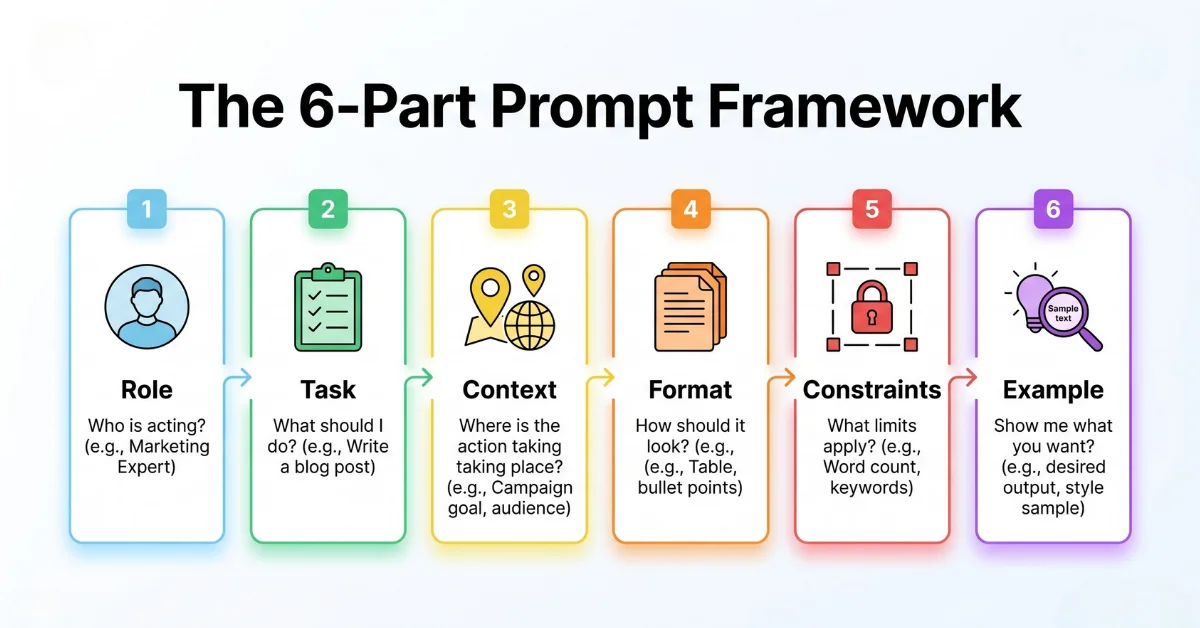
1. Role (The Persona)
Always start by telling the AI who it is. I tested this extensively, and assigning a role or persona primes the model to adopt a specific tone, vocabulary, and knowledge base. It’s the single fastest way to improve output quality.
- Weak: “Explain blockchain.”
- Strong: “Act as a computer science professor simplifying complex topics for first-year university students. Explain blockchain.”
2. Task (The Verb)
Be explicit about the action you want the AI to perform. Use strong, unambiguous verbs. I always ask myself: am I asking it to write, analyze, summarize, refactor, translate, or create?
- Weak: “Here’s my data.”
- Strong: “Analyze the attached CSV data to identify the top three sales trends from the last quarter.”
3. Context (The “Why”)
This is the background information the AI desperately needs to complete the task successfully. Provide data, define the audience, and explain the goal. The more relevant context you provide, the less the AI has to guess.
- Weak: “Write an email to my team.”
- Strong: “Write a motivational email to my sales team. Context: We just missed our quarterly target by 5%, and morale is low. The goal is to acknowledge the effort without making excuses and to refocus everyone on the new quarter.”
4. Format (The Structure)
Here’s the catch: never assume the AI will present information how you want it. Explicitly define the output structure. I usually specify if I need a JSON object, a Markdown table, a bulleted list, or a formal report.
- Weak: “List the pros and cons of remote work.”
- Strong: “Present the pros and cons of remote work in a two-column Markdown table with ‘Advantages’ and ‘Disadvantages’ as the headers.”
5. Constraints (The Rules)
Constraints are the guardrails that keep the AI on track. This includes word count, tone of voice, what *not* to say (negative constraints), and specific keywords to include or avoid.
- Weak: “Create a product name.”
- Strong: “Generate 10 potential product names for a new brand of eco-friendly coffee. Constraints: The names must be two words or less, easy to pronounce, and cannot include the words ‘earth’ or ‘green’.”
6. Example (The Template)
Also known as few-shot prompting, providing an example of the desired output is the ultimate clarifier. It shows the AI exactly what “good” looks like, leaving absolutely nothing to interpretation.
- Weak: “Write a headline for my article.”
- Strong: “Write five compelling headlines for an article about prompt engineering. Follow this example format: ‘Number + Adjective + Noun: The Secret to [Achieving a Goal]’. Example: ’10 Simple Prompts: The Secret to Automating Your Workflow’.”
The Psychology of Prompting: How to Think Like an AI
To truly master prompting, you need to stop thinking of the AI as a creative partner and start thinking of it as an incredibly sophisticated, literal-minded intern. It doesn’t actually “know” anything. It just predicts the next most likely word based on the patterns in its training data and your specific instructions.
Which brings us to two crucial realities:
- It is painfully literal. If you leave a loophole in your instructions, I guarantee the AI will find it. Ambiguity is your enemy. Every single word in your prompt matters.
- It benefits from “Chain of Thought.” Asking an AI to solve a complex problem in one step often fails spectacularly. Instead, I always instruct it to “think step-by-step.” This forces the model to articulate its reasoning process, leading to much more accurate and logical conclusions.
A great prompt anticipates the AI’s “thought process.” It provides all necessary information upfront, closes logical loopholes, and guides the model down a specific path of reasoning. If your prompt isn’t working, don’t just rephrase it—analyze it. Where could a literal machine misinterpret your command? You can use an AI Prompt Checker – Free Tool to Analyze & Optimize Prompts to help spot these weaknesses before you even run the prompt.
10 Copy-Paste Prompt Examples for Real-World Tasks
Here are ten structured prompts I’ve built using the 6-part framework. Feel free to adapt them to fit your specific needs.
For Text & Copywriting
1. The SEO Article Outline Architect
Act as a Senior SEO Content Strategist with 15 years of experience creating content that ranks #1 on Google.
Task: Create a comprehensive article outline for the primary keyword "what is an ai prompt".
Context: The target audience is non-technical beginners. The goal is to create the most helpful, practical guide on the internet for this topic.
Format: Use Markdown. Provide a single H1, followed by 5-7 H2s. Under each H2, list 3-4 bullet points covering the key topics for that section. Also include a 4-question FAQ section.
Constraints: The H2s must address related user search intent, such as "how to write a good prompt" and "prompt engineering examples".
2. The Social Media Content Calendar
Role: Expert Social Media Manager for a B2B SaaS company.
Task: Generate a one-week content calendar for LinkedIn to promote a new webinar.
Context: The webinar is about "Using AI to Boost Sales Productivity". The audience is sales managers and VPs of sales.
Format: A 5-column Markdown table with these headers: Day, Topic, Post Copy (3-4 lines), Call to Action, and Hashtags.
Constraints: The tone should be professional and value-driven. Avoid salesy language. Create posts for Monday, Wednesday, and Friday.
For Technical & Business Tasks
3. The Code Refactoring Assistant
When dealing with complex code, I’ve found providing a clear structure is critical. You can explore this concept further with The Only AI Code Refactoring Prompt Developers Actually Need.
You are a Senior Python Developer specializing in clean, efficient, and well-documented code.
Task: Review the following Python script. First, identify any potential bugs or performance bottlenecks. Second, refactor the code to adhere to PEP 8 standards and improve readability.
Context: This script is intended to process a large dataset and is running slower than expected.
Format: Provide the refactored code in a single code block. Below the code, add a bulleted list explaining the specific changes you made and why.
[PASTE YOUR PYTHON CODE HERE]
4. The Market Research Analyst
Persona: Senior Market Research Analyst.
Task: Analyze the following customer reviews for our product, a project management app. Identify the top 3 most-cited strengths and the top 3 most-requested new features.
Context: We are planning our development roadmap for the next quarter and need to prioritize features based on user feedback.
Format: Present your findings as two distinct bulleted lists: "Top 3 Strengths" and "Top 3 Feature Requests".
[PASTE CUSTOMER REVIEWS HERE]
For Creative & Visual Generation
5. The Midjourney Cinematic Scene
Visual prompts are a different language entirely, relying on technical terms from photography and film. For a dedicated tool that builds these for you, I recommend trying the Free Midjourney Prompt Generator.
cinematic film still of a grizzled space explorer looking at a holographic star map inside the dark cockpit of a spaceship, glowing console lights illuminating his face, volumetric lighting, sense of wonder and isolation, shot on an Arri Alexa with a 35mm anamorphic lens, hyper-detailed, photorealistic --ar 16:9 --style rawVisual Prompting Mastery: Crafting Prompts for Images & Video
Creating images and video with AI requires a completely different mindset. You’re not just describing a scene; you are directing a virtual cinematographer. I noticed early on that success hinges entirely on your ability to use the language of visual arts.
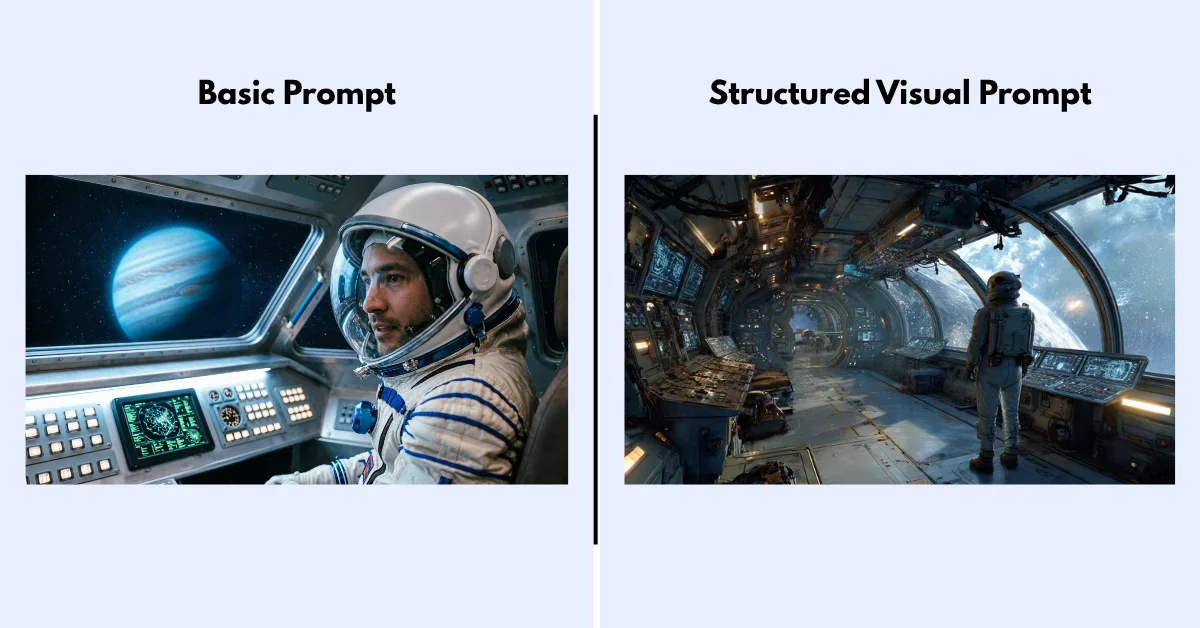
That’s where things get interesting. Key elements of a powerful visual prompt include:
- Subject & Setting: The core of your scene. Be specific and use vivid adjectives.
- Medium: Is it a photograph, a digital painting, a 3D render, or a charcoal sketch?
- Camera & Lens: Specify the shot type (e.g., “wide angle shot,” “macro shot”) and lens (e.g., “85mm lens,” “anamorphic lens”).
- Lighting: This is crucial. Use terms like “volumetric lighting,” “cinematic lighting,” “soft rim light,” or “golden hour” to control the mood.
- Style & Artist: Evoke a specific aesthetic by referencing an art style (“vaporwave,” “cyberpunk”) or an artist (“in the style of Ansel Adams”).
- Technical Parameters: Most tools use parameters like `–ar 16:9` for aspect ratio or `–s 250` for stylization.
For video generation with tools like Sora or Veo, you must also add motion. Describe the camera movement (“slow dolly in,” “crane shot up”) and the action within the scene. For a deep dive into video-specific commands, I’d suggest exploring tools like the Free OpenAI Sora 2 Prompt Generator.
Common Prompting Mistakes and How to Fix Them
If your results are consistently poor, you’re likely making one of these common mistakes I see all the time.
Mistake 1: Being Too Vague
This is the number one error. The AI cannot read your mind. Vague words like “cool,” “interesting,” or “professional” are entirely subjective and lead to generic outputs.
- Fix: Replace subjective adjectives with objective descriptions. I swapped “a cool car” for “a glossy black 1967 Ford Mustang with chrome rims,” and the difference was night and day.
Mistake 2: Providing Conflicting Instructions
Telling the AI to be “concise and comprehensive” or “formal but friendly” creates a paradox. The model will struggle and produce a muddled result.
- Fix: Prioritize your instructions. Choose one primary goal. If you need a mix of tones, provide a clear example of what you mean.
Mistake 3: Forgetting the Format
You can get a perfect answer in an unusable format. If you need code, data, or structured text, you must specify the format every single time.
- Fix: I always add a “Format:” line to all of my important prompts. Be explicit: “Format as a JSON array of objects,” or “Format as a numbered list.”
Frequently Asked Questions
What is the difference between a prompt and a system prompt?
I look at it this way: a user prompt is the instruction you provide for a single task. A system prompt is a higher-level instruction that sets the AI’s persona, rules, and personality for the entire conversation. It acts as a constitution the AI must follow.
Why did my prompt stop working after an AI model update?
AI models are constantly being fine-tuned. I’ve noticed that an update can completely change how the model weighs certain words or instructions. A prompt that worked perfectly on GPT-4 might need slight adjustments for GPT-4o. This is completely normal, and it’s why re-testing your core prompts periodically is a good practice.
How long should an AI prompt be?
There is no magic length. I’ve found a prompt should be exactly as long as it needs to be to remove ambiguity. For a simple task, a few sentences might suffice. For a complex report, a multi-page prompt with extensive context and examples might be necessary. Focus on absolute clarity, not brevity.
Can I use AI to write prompts for me?
Yes, this is an advanced technique called “meta-prompting.” I frequently give an AI a role like “You are a world-class prompt engineer” and ask it to refine or improve my initial prompt for a specific task. This is highly effective for brainstorming and optimizing complex workflows.
Are there jobs for prompt engineering?
Yes, “Prompt Engineer” and “AI Prompt Specialist” are now legitimate job titles at many tech companies. These roles focus on creating and maintaining the high-quality prompt libraries that power AI applications and internal workflows.
The Verdict on Prompt Engineering
Ultimately, prompt engineering isn’t a magic wand that fixes every flaw in generative AI. Even with the perfect 6-part framework, you will still encounter hallucinations, weird formatting quirks, and models that just stubbornly refuse to follow instructions. That said, putting in the effort to structure your prompts transforms the AI from a frustrating, unpredictable slot machine into a reliable, high-leverage tool. The models are only going to get more capable from here, and the people who learn how to speak their language today are the ones who will reap the biggest rewards tomorrow.






)