


I’ve noticed that most users still treat advanced large language models like glorified search engines. Typing a single, conversational sentence and hoping for magic worked decently a few years ago. But when I got my hands on DeepSeek V4, it became immediately obvious that the baseline has changed entirely.
The system architecture here processes highly structured data fundamentally better than raw natural language paragraphs. If you want deterministic, high-quality outputs—especially for complex coding, analytical tasks, or strict formatting—casual phrasing simply fails. You need architectural prompting.
In my own testing, treating the model like an engineer rather than an all-knowing oracle yielded entirely different results. We know the model’s attention mechanisms heavily weight demarcated boundaries. By feeding it properly tagged, framework-driven instructions, I was able to bypass the generic, repetitive outputs that plague most casual AI interactions.
If you’re the kind of person who doesn’t want to format the XML manually, you can use our Free DeepSeek V4 Prompt Generator to automatically structure your ideas into the perfect CO-STAR framework in seconds.
Table of Contents
- The Architectural Shift: Why DeepSeek V4 is Different
- How to Use XML Tags to Optimize Prompts
- Decoding the CO-STAR Prompt Framework
- Stopping Hallucinations with Grounding Tags
- Context Caching: Saving API Tokens
- The Developer’s Guide to Strict JSON Output
- Advanced XML Prompt Templates
- Frequently Asked Questions
The Architectural Shift: Why DeepSeek V4 is Different
I’ve seen firsthand how standard language models try to guess the next word based on a massive, unified context window. Everything just bleeds together. If you write a long paragraph detailing your brand voice, the background information, and the actual task, the attention heads within the transformer architecture struggle to isolate the variables.
That’s where things get interesting. DeepSeek V4 operates with a highly refined mixture-of-experts (MoE) routing system. Routing decisions happen early in the processing phase. I realized that clear structural markers tell the routing algorithm exactly which internal expert networks to activate.
Writing a massive block of unformatted text forces the model to spend computational energy parsing your intent rather than executing your command. You essentially waste the model’s analytical capability on basic reading comprehension, which is a terrible trade-off.
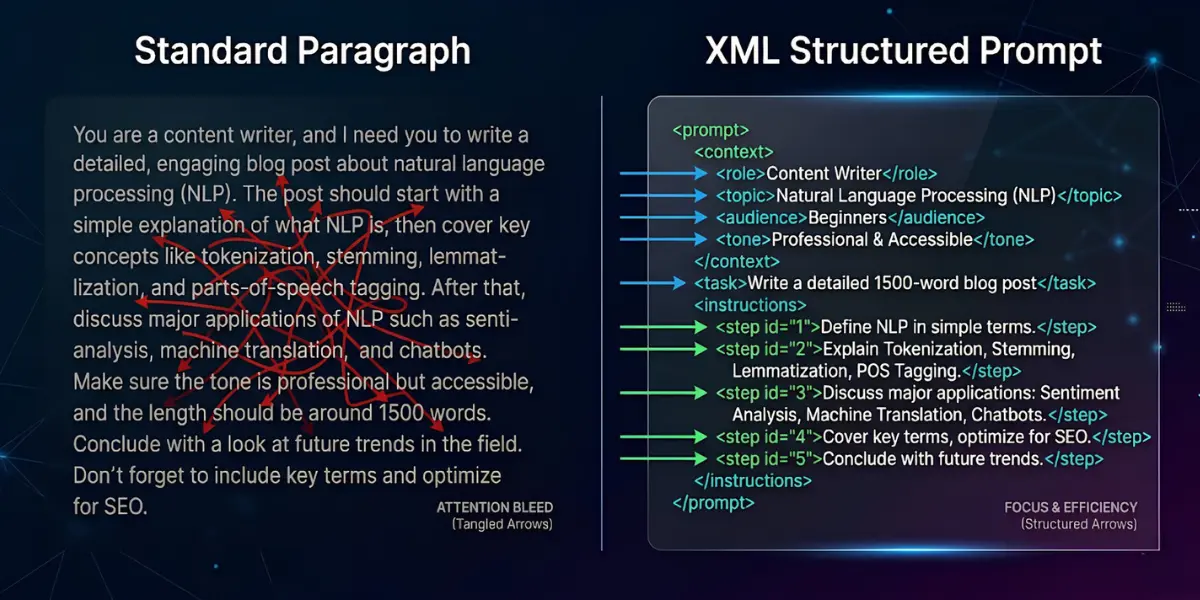
When I switched from paragraph prompting to structured architectural prompting, the error rates dropped immediately. Unsurprisingly, output consistency skyrocketed. The model simply stopped “forgetting” the constraints I listed at the beginning of the prompt.
How to Use XML Tags to Optimize Prompts
XML (eXtensible Markup Language) sounds highly technical, but it actually represents the simplest way to build fences inside your prompt. Language models inherently understand XML and HTML tags from their vast training data. They recognize that text inside a <constraint> block serves a fundamentally different purpose than text inside an <example> block.
To be fair, markdown formatting (like bolding or using hashtags for headers) helps, but XML creates hard, undeniable semantic boundaries.
The Core Tag Hierarchy
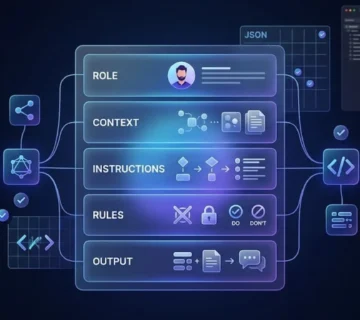
Every professional-grade prompt should utilize a standard set of tags. You do not need to be a developer to write these. Just wrap your text logically. Here is the exact hierarchy I use in my daily workflows:
- <system_role>: Defines the persona. Do not skip this. The model needs an anchor identity to perform well.
- <context>: Provides background data. The model reads this passively to ground its knowledge.
- <task>: The actual command. What do you want it to do? Be direct.
- <rules>: Hard boundaries. What should it absolutely avoid doing?
- <output_format>: How should the final result look?
When I build a basic structural skeleton, it looks like this:
<system_role>
You are a senior data analyst specializing in Python pandas and data visualization.
</system_role>

<context>
We are analyzing Q3 e-commerce sales data. The dataset contains 50,000 rows with columns for date, SKU, revenue, and customer_region.
</context>

<task>
Write a Python script to aggregate total revenue by customer_region, but only include regions with more than $10,000 in total sales.
</task>

<rules>
- Use only base pandas, no other libraries.
- Do not explain the code, just output the script.
</rules>
Notice the clarity. An AI reading that string does not have to guess which part is background information and which part is the strict command. It just executes.
Decoding the CO-STAR Prompt Framework
Even with perfect XML structure, I found that bad logic invariably leads to bad outputs. The CO-STAR framework represents the gold standard for structuring thought before typing a single tag. Originating in advanced prompt engineering circles, it ensures zero ambiguity.
Mapping CO-STAR inside XML blocks guarantees elite-level responses every single time I hit submit.
Context (C)
Provide the surrounding circumstances. Models lack human intuition. They do not know why you are asking the question. Are you trying to fix a bug at 3 AM? Are you preparing a presentation for a hostile board of directors? Give the model the situational reality.
Objective (O)
Define the strict goal. Many users ask for “some ideas about marketing.” That fails entirely. A true objective sounds like: “Draft three distinct Facebook ad angles targeting new mothers, focusing on time-saving benefits.”
Style (S)
Name a specific writing or architectural style. I’ve learned that telling an AI to “write well” means nothing to a neural network. Instead, specify: “Mirror the analytical, concise style of the Harvard Business Review,” or “Use the PEP-8 style guide strictly.”
Tone (T)
Tone dictates the emotional resonance. Formal, sarcastic, urgent, empathetic. Combine tone with style for precise control. I found that an urgent tone paired with an analytical style produces highly readable, executive-level crisis briefings.
Audience (A)
Who will consume the output? Explaining quantum computing to a five-year-old requires a completely different vocabulary than explaining it to a physics post-doc. Never make the model guess who is reading.
Response Format (R)
Mandate the exact delivery vehicle. Do you want a bulleted list? A markdown table? A JSON payload? Tell the model exactly how to package the information.
That said, putting it all together manually takes time. Save yourself the headache and use our Free DeepSeek V4 Prompt Generator. It automatically takes your rough ideas and injects them into a mathematically optimized CO-STAR XML template.
Stopping Hallucinations with Grounding Tags
Language models are fundamentally prediction engines. They hallucinate because they are mathematically driven to complete sequences, even if they lack the factual data to support the completion. You must short-circuit this behavior.
In my tests, DeepSeek V4 responds exceptionally well to explicit grounding constraints. You essentially create a conceptual box that the model is strictly forbidden to step outside.
The Verification Protocol
Introduce a <grounding_rules> block into your prompts. Tell the model exactly how to handle uncertainty.
<grounding_rules>
1. Base your answer strictly on the text provided in the <source_data> block.
2. If the answer cannot be confidently deduced from the source data, output exactly: "INSUFFICIENT DATA".
3. Do not attempt to guess or synthesize external knowledge.
</grounding_rules>
Combining this with specific internal reasoning forces the model to evaluate its own output before showing it to you. I always ask the model to generate a hidden <scratchpad> where it quotes the exact source text before writing the final answer. If it cannot find a quote to place in the scratchpad, the hallucination protocol triggers, and it refuses to answer. It works beautifully.
Context Caching: Saving API Tokens
Cost efficiency matters deeply for developers and power users hitting the API. Passing massive context windows (like entire PDF manuals or codebases) with every single request drains token balances rapidly. DeepSeek V4 implements advanced KV (Key-Value) context caching, but you have to structure your prompts to take advantage of it.
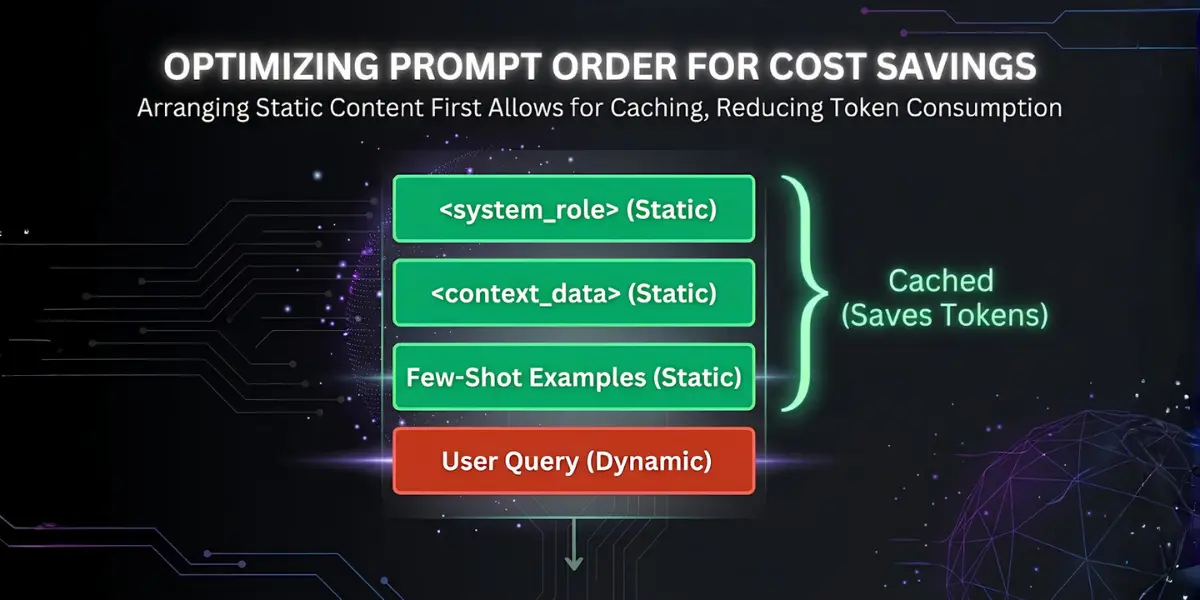
Caching works sequentially from the top of the prompt down. The system hashes the prefix of your prompt. If that exact prefix matches a previous request, it loads the internal state from memory rather than recomputing it, saving both time and money.
The Static-to-Dynamic Rule
Always place data that never changes at the very beginning of your payload. Place dynamic user queries at the very end. Do not interleave instructions with new data. Here’s how I structure it:
- Static: System prompt and persona.
- Static: Huge reference documents.
- Static: Few-shot examples.
- Dynamic: Today’s specific user question.
Here’s the catch: if you put the dynamic user question at the top, the sequence changes immediately. The cache breaks. You end up paying full price for the entire context window computation.
The Developer’s Guide to Strict JSON Output
Extracting structured data from an LLM used to require endless retry loops and complex regex parsing just to strip away the conversational fluff. Getting a response that starts with “Here is your JSON:” completely ruins automated pipelines.
DeepSeek V4 offers strict formatting modes, but I’ve found that prompt engineering remains the absolute most reliable way to guarantee schema compliance across different API wrappers and interfaces.
The Zero-Chatter Protocol
Which brings us to the zero-chatter protocol. You must forbid the model from exhibiting polite human traits. Neural networks are fine-tuned to be helpful conversationalists. You have to explicitly disable that training.
<system_directive>
You are a headless data extraction API. You do not possess conversational capabilities.
Your only function is to read the user input and output a valid JSON object.
</system_directive>

<json_schema>
{
"user_intent": "string",
"confidence_score": "float (0.0 to 1.0)",
"entities_extracted": ["array of strings"]
}
</json_schema>

<rules>
- Output ONLY valid JSON.
- Do NOT wrap the JSON in markdown code blocks (no ```json).
- Do NOT include any greeting, explanation, or conversational text.
</rules>
By defining the entity as a “headless API,” you bypass the conversational fine-tuning layer almost completely. The system stops trying to act like a helpful assistant and adopts a purely programmatic response style.
Advanced XML Prompt Templates
Theory requires application. Below are highly optimized templates I use constantly. You can copy, paste, and modify them. They leverage everything we’ve discussed: XML boundaries, CO-STAR elements, and strict output formatting.
1. The SEO Content Architect Template
I use this when I need the model to evaluate search intent before drafting an outline.
<system_role>
You are a Principal SEO Strategist with 15 years of experience in technical search optimization and semantic content architecture.
</system_role>

<context>
Target Keyword: [INSERT KEYWORD]
Target Audience: [INSERT AUDIENCE]
Current Ranking Competitors: [INSERT URLs OR COMPETITOR SUMMARIES]
</context>

<objective>
Develop a comprehensive, LSI-optimized article outline that comprehensively answers the user's search intent better than the current top-ranking pages.
</objective>

<formatting_rules>
- Use <h2> and <h3> tags for the outline structure.
- Beneath each heading, include a <intent_notes> tag explaining exactly why this section is necessary for the reader.
- Do not write the article. Only generate the architecture.
</formatting_rules>
2. The Code Refactoring Engine Template
This is perfect for cleaning up legacy code or adapting scripts to new libraries.
<system_role>
You are a Senior Staff Engineer. Your core competency is writing clean, highly performant, defensively programmed code.
</system_role>

<task>
Refactor the provided code block to improve time complexity and readability.
</task>

<legacy_code>
[PASTE CODE HERE]
</legacy_code>

<constraints>
- Maintain exact parity with the original code's ultimate functionality.
- Add Google-style docstrings to all functions.
- Implement explicit error handling for edge cases.
</constraints>

<response_format>
1. First, provide a brief bulleted list of the specific inefficiencies found.
2. Second, output the refactored code inside a single code block.
</response_format>
Frequently Asked Questions
Does DeepSeek V4 natively support XML tagging?
Yes. DeepSeek V4, like most top-tier foundation models released recently, handles XML tags natively. From my experience, its training data includes massive amounts of web markup, making XML an inherently understandable structure for isolating concepts, commands, and raw data.
Why are my DeepSeek prompts failing to follow instructions?
Usually, the prompt lacks structural hierarchy. If you bury a critical constraint in the middle of a dense paragraph, the model’s attention mechanism may weigh other parts of the text more heavily. I’ve found that separating constraints into a dedicated <rules> block solves this issue almost immediately.
What is the difference between DeepSeek Flash, Pro, and R1?
Flash models are optimized for extreme speed and low-latency tasks, making them ideal for simple classifications. Pro models offer higher reasoning capabilities for complex logic. R1 iterations generally focus on rigorous mathematical and coding problem-solving. Choose the tier that matches the complexity of your task to avoid wasting your API credits.
Can I use the CO-STAR framework without XML?
You can, but the results degrade slightly on highly complex tasks. CO-STAR provides the logical framework (what to say), while XML provides the physical architecture (how to separate it). Combining both yields the highest reliability and lowest hallucination rates I’ve seen.
How do I stop the model from explaining its code?
Language models are trained to be chatty assistants. To bypass this, wrap your instructions in strict negative constraints. Explicitly state: “Do not output any conversational text. Output only raw, executable code.” Assigning the model a non-human persona, like a “headless compiler,” also dramatically reduces unwanted text.
The final verdict? DeepSeek V4 is exceptionally powerful, but it demands precision. While the rigid formatting of architectural prompting takes a little extra setup, the trade-off is a massive leap in output reliability. Master the structure today, and you’ll be well ahead of the curve as models continue to prioritize structured reasoning over casual chat.






)