I’ve been there. Staring at the empty text box of an AI image generator can be entirely paralyzing. You might have a vivid, breathtaking image in your mind. You type out a quick description, hit generate, and wait for the magic. And yet, a few seconds later, the artificial intelligence hands you a blurry, chaotic mess that looks absolutely nothing like your original vision.
The gap between your imagination and the AI’s output isn’t a lack of creativity on your part. It’s a lack of syntax. I’ve spent enough time testing generative models like Midjourney, Stable Diffusion, and DALL-E 3 to know they do not understand human emotion or abstract desire. They are mathematical prediction engines that respond strictly to structured data, token hierarchy, and specific terminology.
If you feed an AI unstructured, conversational thoughts, it will just guess your intentions and fill in the blanks with generic training data. To generate professional, commercial-grade artwork, I realized I had to stop guessing keywords and start using proven architectural frameworks. I decided to break down the exact text-to-image prompt formulas used by top digital artists to control lighting, style, camera angles, and composition flawlessly.
Table of Contents
- The Universal 4-Part Prompt Architecture
- 1. The Photorealistic Portrait
- 2. The Cinematic Film Still
- 3. The 3D Isometric Asset
- 4. The Flat Vector Logo & Illustration
- 5. The Architectural Visualization
- 6. The Macro Product Photography
- 7. The Ethereal Fantasy Concept
- Don’t Forget the Negative Prompt Formula
- The Secret Ingredient: Iteration and Seed Parameters
- Frequently Asked Questions (FAQ)
- The Verdict
The Universal 4-Part Prompt Architecture
Before experimenting with niche visual styles, you really need to understand the foundational anatomy of a generative AI prompt. I’ve found that every top-tier text-to-image prompt, regardless of the platform, follows a strict hierarchy. AI models inherently assign the heaviest token weight to the words at the very beginning of your prompt, with their influence degrading as the sentence continues.
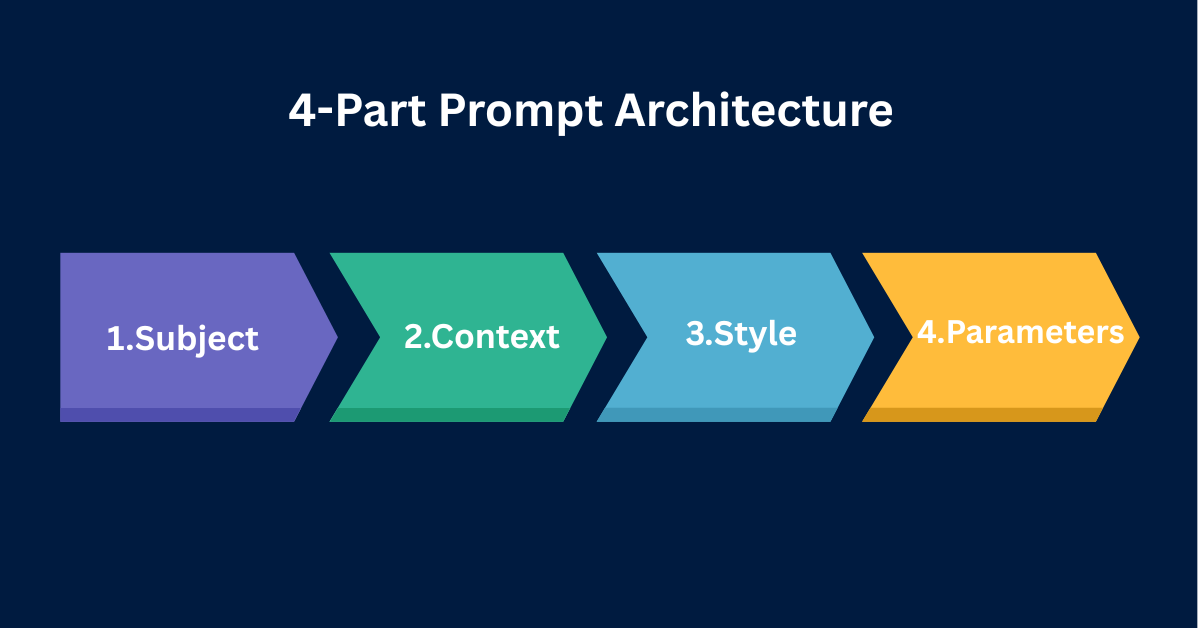
To maximize control over the output, I always build my prompts using the Universal 4-Part Architecture. This structure guarantees that the AI processes the core subject before attempting to apply complex lighting or stylistic filters.
- Part 1: The Subject (Who/What): The focal point of the image. This should be explicitly defined. Don’t just say “a man.” Say “a 50-year-old grizzled sailor with a thick white beard.”
- Part 2: The Context (Where/Action): The environment and what the subject is doing. “Standing on the deck of a wooden ship during a violent hurricane.”
- Part 3: The Style (Medium/Artist): How the image was created. I always specify if it’s an oil painting, an anime still, or a photograph. “High-contrast digital painting, dark fantasy aesthetic, intricate details.”
- Part 4: The Technical Constraints (Lighting/Camera): The specific parameters that define the rendering. “Volumetric lighting, shot on 35mm lens, f/1.8, cinematic color grading, –ar 16:9.”
That’s where things get interesting. If you jumble these four elements together randomly, the AI suffers from “concept bleed.” For example, I noticed that if you place your camera lens details before your subject, the AI might attempt to draw an actual camera rather than applying the lens effect to the scene. You have to stick to the architecture.
1. The Photorealistic Portrait
The Logic
Generating a realistic human face is notoriously difficult for AI. I’ve seen models default to hyper-symmetrical, plastic-looking faces that immediately trigger the uncanny valley. To fix this, your prompt must force the AI to render imperfections, specific skin textures, and professional studio lighting setups.
The Syntax
[Subject definition + Age + Ethnicity] +[Specific physical flaws/details] + [Clothing] + [Environment/Backdrop] + [Lighting setup] +[Camera body and specific Lens focal length] + [Film stock/Color grade] + [Parameters]The Test
To avoid layout shifts and ensure you capture every technical comma, I recommend copying the block below directly into your image generator. Here’s the exact prompt I tested:
A close-up portrait of a 60-year-old Scottish fisherman, deep wrinkles, sun-weathered skin, faint scar above the left eyebrow, wearing a thick yellow rain jacket. Dark stormy ocean in the blurred background. Soft Rembrandt lighting, harsh shadows on the right side of the face. Shot on medium format camera, 85mm portrait lens, f/2.8, Fujifilm Pro 400H color grading, photorealistic, 8k resolution --ar 4:5 --style raw2. The Cinematic Film Still
The Logic
When you want to tell a story, standard photography prompts feel way too static. You need the image to look like a paused frame from a Hollywood blockbuster. This requires invoking specific cinematic terminology, wide aspect ratios, and dramatic lighting directions to create visual tension.
The Syntax
Cinematic film still from [Genre] movie + [Subject performing a dynamic action] + [Detailed environment] + [Lighting direction + Atmosphere] + [Cinematic camera angles] + [Color palette] +[Parameters]The Test
This prompt forces the AI to prioritize narrative tension over flat, centered compositions. Here’s what I asked it to render:
Cinematic film still from a 1980s cyberpunk thriller. A weary detective in a trench coat leaning against a brick wall, smoking a cigarette. Rain-slicked alleyway reflecting bright neon signs. Heavy volumetric fog, harsh blue and pink rim lighting. Low angle shot, anamorphic lens flare, deep depth of field, moody atmosphere, gritty texture --ar 21:9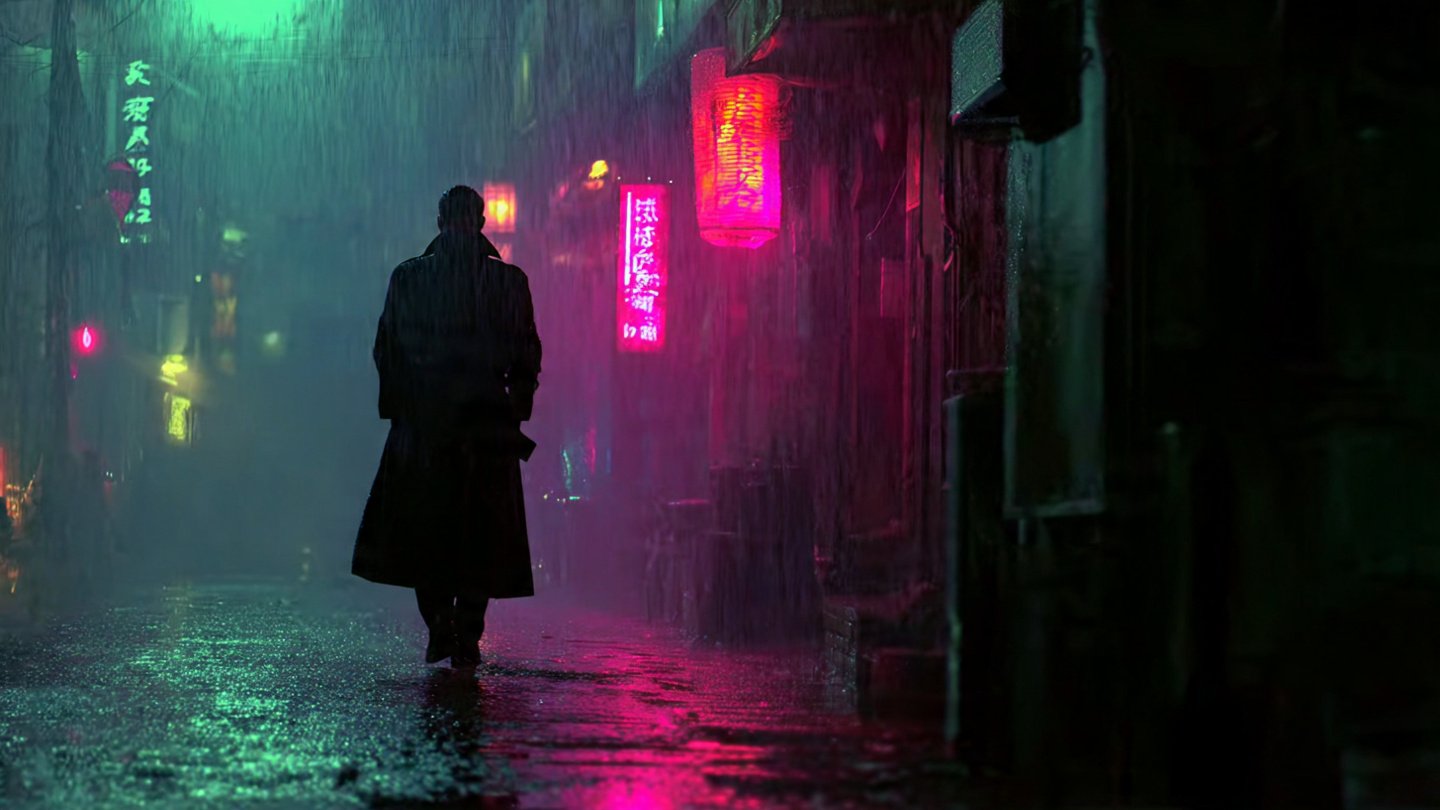
3. The 3D Isometric Asset
The Logic
Game developers, UI/UX designers, and web developers frequently need clean, isolated 3D assets. Generative AI is phenomenal at creating these, but I learned you must instruct it to use a specific geometric camera angle and a neutral background so the asset can be easily cut out later.
The Syntax
3D isometric render of [Specific Object/Building] + [Materials and Textures] + [Small environmental details] + [Background color constraint] + [Rendering engine] +[Lighting style] + [Parameters]The Test
Notice the inclusion of “solid white background” and “Unreal Engine 5.” I’ve found these are critical tokens for asset generation. Here is the prompt I used:
3D isometric render of a cozy modern coffee shop building. Exterior view, matte pastel materials, large glass windows, small wooden patio tables with tiny potted plants. Solid white background. Soft studio lighting, ambient occlusion, rendered in Unreal Engine 5, Octane render, highly detailed, clean vector style --ar 1:14. The Flat Vector Logo & Illustration
The Logic
AI models naturally lean toward complex, highly detailed gradients. If you want a minimalist, flat vector design suitable for a logo or modern web illustration, you have to actively restrict the AI’s rendering capabilities. You must explicitly forbid 3D shading and photorealism.
The Syntax
Flat vector illustration of [Subject] +[Action/Pose] + [Style references] + [Color palette] + [Background constraint] + [Negative constraints if applicable]The Test
I tested this framework, and it’s perfect for generating hero images for websites or blog post graphics. The result was exactly what I needed:
Flat vector illustration of a developer sitting at a modern desk typing on a laptop. Minimalist corporate art style, smooth curves, no outlines, 2D graphic. Color palette of vibrant teal, navy blue, and warm yellow. Solid off-white background. Clean vector shapes, UI/UX design asset --no shading, gradients, 3d, realism5. The Architectural Visualization
The Logic
Architectural renders require precise geometry, realistic materials, and a deep understanding of natural light. When prompting for architecture, I noticed the focus shifts entirely away from humans and toward structural materials, time of day, and specific design movements (like Brutalism or Mid-Century Modern).
The Syntax
Architectural visualization of [Building Type + Architectural Style] + [Specific construction materials] + [Surrounding landscape] +[Time of day + Weather] + [Photography style] + [Parameters]The Test
For architectural prompts, utilizing the Golden Hour or Blue Hour yields the most photorealistic lighting. Here is the prompt I used to test this:
Architectural visualization of a luxury Mid-Century Modern villa on a cliffside. Floor-to-ceiling glass windows, dark mahogany wood panels, exposed concrete. Infinity pool overlooking a misty pine forest. Golden hour lighting, warm sun rays casting long shadows. Shot on Canon EOS R5, 14mm ultra-wide angle lens, photorealistic, ArchDaily feature --ar 16:96. The Macro Product Photography
The Logic
Marketers and ecommerce brand owners can generate highly convincing product mockups using AI. The key to product photography is absolute clarity on the subject, a shallow depth of field to blur the background, and commercial lighting techniques that highlight the product’s texture.
The Syntax
Commercial product photography of[Specific Product] + [Material properties] + [Resting surface/Environment] + [Lighting setup] +[Camera lens + Focus parameters] + [Parameters]The Test
Using terms like “macro lens” and “bokeh” ensures the product stays sharply in focus while the background melts away. Here is the test prompt:
Commercial product photography of a sleek matte black perfume bottle. Glass texture reflecting light, gold metallic cap. Resting on a slab of wet dark slate. Blurred background of dark green fern leaves. Softbox lighting, studio setup, macro lens, f/1.4, shallow depth of field, smooth bokeh, highly detailed commercial mockup --ar 4:57. The Ethereal Fantasy Concept
The Logic
When you want to break the rules of reality and generate concept art for fantasy worlds, you have to lean into heavy artistic stylization. Instead of camera lenses, I reference specific artistic mediums, color flows, and magical atmospheres to let the AI’s creative hallucination work in my favor.
The Syntax
Ethereal concept art of[Mythical Subject] + [Surreal Action/Pose] + [Magical environment] + [Color flow/Atmosphere] + [Artistic medium + Style references] + [Parameters]The Test
This formula is ideal for book covers, RPG assets, and imaginative digital paintings. Here is the prompt I fed the model:
Ethereal concept art of a colossal glowing forest spirit shaped like a stag. Standing in a crystal cavern. Bioluminescent flora glowing in the dark, floating glowing embers in the air. Deep violet and cyan color palette. Intricate digital painting, Greg Rutkowski style, trending on ArtStation, highly detailed, magical atmosphere --ar 16:9 --stylize 250Don’t Forget the Negative Prompt Formula
Telling the AI what you want is only half the battle. I’ve learned the hard way that telling the AI what you absolutely do not want is often the secret to a flawless generation. This is achieved through Negative Prompts.
If you are using Stable Diffusion, you have a dedicated Negative Prompt text box. If you are using Midjourney, you must use the --no parameter at the very end of your prompt. Negative prompting is absolutely essential for preventing mutated hands, unwanted text, or the wrong artistic medium from bleeding into your work.
The Universal Negative Prompt Structure
I always copy this base negative prompt string and append it to my generations to force cleaner, safer outputs:
--no ugly, deformed, noisy, blurry, distorted, out of focus, bad anatomy, extra limbs, poorly drawn face, poorly drawn hands, missing fingers, floating limbs, disconnected limbs, mutation, mutated, ugly, disgusting, amputation, watermark, text, signatureFor more specific scenarios, you can use contextual negative prompts. If I’m trying to generate a realistic photograph and the AI keeps making it look like an oil painting, I simply add --no illustration, painting, drawing, art, 3d render. This forces the model to exclude those stylistic tokens from its calculations entirely.
The Secret Ingredient: Iteration and Seed Parameters
The biggest mistake I see beginners make is assuming the first generation will be perfect. Professional prompt engineers rarely use their first output. They iterate. Here’s the catch: if you simply rewrite your prompt and hit generate again, the AI starts from a completely new pattern of random noise, completely changing the composition.
To iterate professionally, you must understand the Seed Parameter. Every image generated by an AI starts from a specific noise pattern, identified by a unique Seed Number. By retrieving that seed number and adding it to your new prompt (using --seed 12345678 in Midjourney or locking the seed in Stable Diffusion), you force the AI to use the exact same starting point.
This allows you to change a single variable in your text—such as changing a “red shirt” to a “blue shirt”—without the subject moving their pose or the background altering. It provides surgical control over the refinement process.
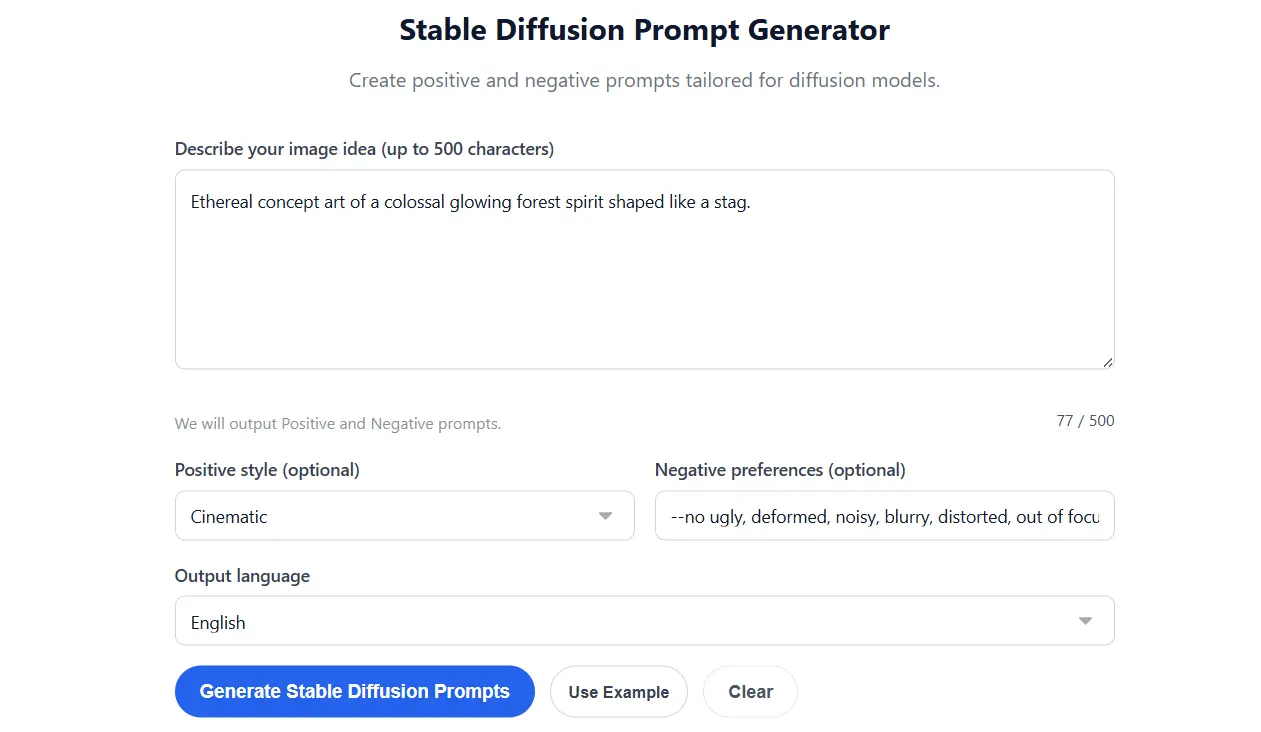
If you find manual iteration and parameter tracking exhausting, you can streamline your workflow significantly. Using a Free Image Prompt Generator or a dedicated Free Midjourney Prompt Generator allows you to input your core ideas and instantly output perfectly formatted, parameter-rich prompt sequences. These tools ensure your syntax is flawless before you spend a single generation credit.
Frequently Asked Questions (FAQ)
How long should a text-to-image prompt be?
I’ve found that prompt length depends heavily on the model. Midjourney v6 prefers natural, highly descriptive sentences and assigns the most weight to the first 40 words. Stable Diffusion 1.5, on the other hand, prefers comma-separated keywords. Generally, a prompt between 30 and 60 words hits the sweet spot between providing enough detail and avoiding “concept bleed,” where the AI gets confused by too many instructions.
Does punctuation matter in AI art prompts?
Yes, punctuation matters significantly. I use commas as soft breaks, helping the AI separate different concepts (e.g., separating the subject from the background). Double colons (::) are used in Midjourney for hard multiprompting and assigning specific mathematical weights to different words. Periods help close out completely distinct ideas within natural language models like DALL-E 3.
What is prompt weighting?
Prompt weighting is a technique I use to tell the AI which words are most important. In Stable Diffusion, you use parentheses to increase weight, such as (photorealistic:1.5), meaning that word is 1.5 times more important than the rest. In Midjourney, you use double colons, such as “cinematic lighting::2”. This prevents background details from overpowering your main subject.
Why does the AI ignore parts of my prompt?
AI models read text sequentially and have a limited “attention span.” I noticed that if you place a critical detail at the very end of a 100-word prompt, the AI will likely ignore it because its computational weight has already been spent on the earlier words. Always place your most important concepts (Subject and Action) at the very front of the prompt.
Can I use ChatGPT to write Midjourney prompts?
Yes, using Large Language Models like ChatGPT or Claude to act as your “prompt engineer” is highly effective. I often instruct ChatGPT on the Universal 4-Part Architecture and ask it to expand a simple idea into a highly detailed, token-rich prompt ready to be pasted into my image generator of choice.
The Verdict
Mastering AI image generation isn’t about finding a magic word; it’s about learning a new technical syntax. The formulas I tested here consistently push models like Midjourney and Stable Diffusion to produce highly controlled, commercial-grade results, but they aren’t foolproof. You’ll still encounter bizarre artifacts and the occasional mutated hand. That said, applying a strict architecture to your prompts removes the guesswork and saves you time and credits. As these models evolve, the exact parameters might shift, but the underlying logic of clearly defining your subject, style, and constraints will remain the absolute foundation of good prompt engineering.