

I’ve spent enough time with google veo 3 prompt engineering to know that most bad generations are not really a model problem. They are directing problems. People write one giant sentence, throw in “cinematic,” add a camera movement at the end, and hope Veo figures out what matters.
That approach is backwards. A video model needs to understand who or what matters, what is moving, where the camera is, how the environment behaves, and what the viewer should hear. When those decisions are mixed together without hierarchy, the result often looks impressive for a second and then falls apart.
My approach is much more deliberate. I treat every Veo prompt like a miniature shot brief: cinematography first, subject and action next, then context, style, sound, and the constraints that protect continuity. I’ve found that this simple change makes prompts far easier to debug and improve. For faster prompt construction, I also use the Promptsera Veo 3 Prompt Generator to turn a rough idea into a stronger production-ready brief.
In this guide, I’ll show you the exact framework I use for google veo 3 prompt engineering, how I direct camera motion without making shots chaotic, how negative prompting can reduce unwanted music and motion drift, how I write dialogue and sound effects, how I preserve continuity across generations, and how Veo 3.1 compares with Runway Gen-3.
Table of Contents
- Core Anatomy of a Google Veo 3 Prompt
- Google Veo 3 Prompt Engineering for Camera Movement & Framing
- Temporal Consistency: Keeping Subjects and Style Stable
- Negative Prompting for Google Veo 3.1: Suppressing Background Music & Motion Drift
- Prompting Synchronized Dialogue, Sound Effects, and Ambient Audio in Veo 3.1
- Google Veo 3.1 vs. Runway Gen-3 Quick Reference
- Google Veo 3 Prompt Engineering with Structured JSON and Promptsera
- FAQ
- The Verdict
Google Veo 3 Prompt Engineering: Core Anatomy of a Video Prompt
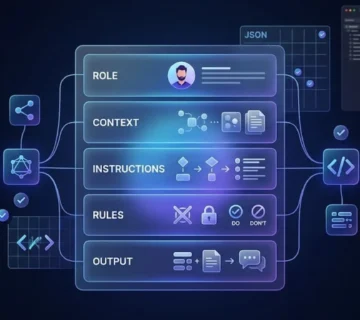
I don’t start with adjectives. I start with structure. A strong Veo prompt works best when I define the cinematography, subject, action, context, and style or ambiance before layering in audio and continuity details.
Think of the five core parts as a hierarchy. Cinematography tells Veo how the scene is filmed. Subject tells it what deserves attention. Action gives the video something to do. Context establishes the physical world. Style and ambiance determine how that world feels. I often add audio and continuity after those five layers because they are easier to control once the visual foundation is clear.
Here is the basic template I recommend:
[Cinematography] + [Subject] + [Action] + [Context] + [Style & Ambiance] + [Audio]Compare that with a vague instruction such as “a warrior walking through a cinematic ancient city.” There is almost nothing for the model to prioritize. My version gives the shot a physical direction, a subject, an action, an environment, a mood, and a sonic identity:
Medium tracking shot of a weathered Mesopotamian warrior walking slowly through a crowded ancient city market at sunrise. Merchants move around him while dust catches the warm morning light, clay walls and wooden stalls filling the background. The camera tracks backward at walking pace, keeping his face sharp while the crowd falls slightly out of focus. Historically grounded cinematic realism, natural skin texture, restrained earth-tone palette, subtle atmospheric haze. Ambient market chatter, sandals on packed earth, distant livestock, and soft wind through hanging fabric.The difference is not that the second prompt is “longer.” It is that every sentence carries a production decision. That is the central idea behind effective Veo prompting.
- Specificity: Name observable things rather than vague qualities such as “beautiful” or “epic.”
- Action: Give the subject a clear physical behavior instead of merely placing it in a scene.
- Hierarchy: Put the most important visual decisions where they are easy to interpret.
- Constraint: Describe what should remain stable as well as what should change.
Google Veo 3 Prompt Engineering for Camera Movement & Framing
Camera language is where I see one of the biggest differences between amateur and professional-looking prompts. Terms such as dolly, tracking shot, crane shot, slow pan, POV, close-up, wide shot, and shallow depth of field are useful because they describe recognizable cinematographic operations rather than vague visual moods.
The mistake is trying to use all of them at once. I use one primary camera movement and one framing choice unless the shot genuinely requires a transition. “Orbiting drone camera while simultaneously zooming, panning, tilting, and pushing in” sounds cinematic on paper but gives the model too many competing instructions.
I also separate camera movement from subject movement. A dolly-in means the camera approaches. A character walking toward the lens is subject motion. When both happen together, I describe both explicitly.
Wide establishing shot of a lone explorer standing at the entrance to an enormous subterranean temple. The camera begins completely static, then performs a slow dolly-in toward the explorer over the duration of the shot. The explorer remains centered and relatively still while dust drifts through shafts of overhead light. Deep focus, natural perspective, restrained cinematic contrast, realistic stone textures.For a more dynamic shot, I might use:
Low-angle tracking shot following a young cyclist as she races through a narrow rain-soaked city street at night. The camera moves smoothly beside her at matching speed, keeping her face and bicycle sharp while neon reflections streak across the wet pavement. Subtle handheld energy without excessive shake, shallow depth of field, 35mm cinematic lens look, cool night atmosphere.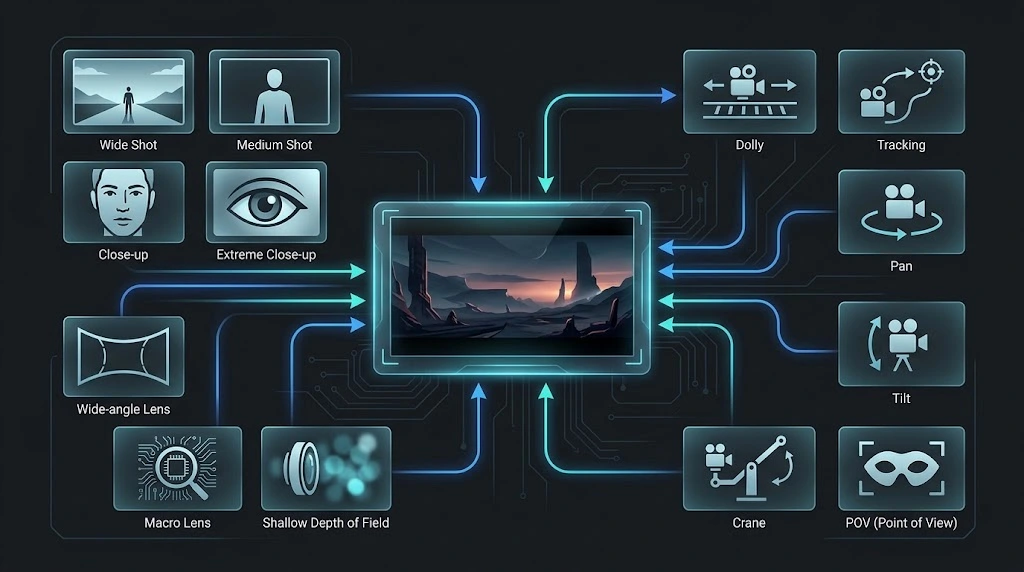
One more rule has saved me countless generations: choose the shot based on what you need the audience to notice. Use a wide shot for geography and scale. Use a medium shot for action and interaction. Use a close-up for emotion, texture, or a critical object. The camera should support the story, not compete with it.
That is why I prefer phrases such as “slow push-in toward the character’s eyes” over simply writing “cinematic camera.” The first describes an operation. The second describes a mood.
Temporal Consistency: Keeping Subjects and Style Stable
A beautiful first frame means very little if the character’s clothing changes halfway through the clip, the object rotates unpredictably, or the lighting jumps between shots. Temporal consistency is one of the hardest parts of AI video because the model has to maintain a believable world while also generating motion.
I solve that problem by making continuity explicit. Instead of describing the character from scratch with different adjectives every time, I establish a compact identity block and preserve the key attributes across prompts. I repeat the details that matter: hairstyle, clothing, distinctive accessories, body proportions, color palette, location, and lighting direction.
Character continuity: the same 42-year-old woman in every shot, olive skin, shoulder-length dark brown hair, small silver hoop earrings, charcoal wool coat, dark green scarf, calm but alert expression. Preserve identical facial features, hairstyle, clothing, proportions, and accessories throughout the sequence.Reference images can make this workflow even stronger. When a model or interface supports reference-driven generation, I use the reference to establish the character, object, or environment, then keep my text prompt focused on what should happen next.
When continuity matters, I also keep the environment stable. A common mistake is changing the character while accidentally changing everything around them. My prompts therefore contain environmental anchors as well: “same apartment,” “same afternoon sunlight,” “same wardrobe,” “same camera height,” or “same color grade.” These may sound repetitive. That is exactly why they work.
- Identity anchors: Repeat the physical features that must survive from one shot to the next.
- Environment anchors: Keep location, lighting, weather, and major props explicit.
- Motion anchors: Define how the body, camera, and important objects should move.
- Style anchors: Reuse the same visual language rather than reinventing the look in every prompt.
I also resist the temptation to cram an entire movie into one generation. Veo is much easier to direct when each clip has a clear purpose. Build the sequence shot by shot, then connect those shots through consistent references, framing, movement, and audio.
Negative Prompting for Google Veo 3.1: Suppressing Background Music & Motion Drift
Negative prompting is one of the areas where I see contradictory advice online. Some creators write enormous “negative prompts” full of dozens of things they don’t want. That usually makes the instruction harder to understand. I prefer a much narrower approach: only suppress a behavior when that behavior is actively fighting the shot.
For audio, this is particularly useful. Suppose I’m generating a quiet documentary-style scene and Veo keeps adding dramatic background music. I don’t want to replace the entire prompt. I simply make the audio requirement explicit and state the unwanted behavior directly.
Natural location audio only. No background music. No cinematic score. Keep the scene grounded in realistic environmental sound.For motion drift, I do the same thing. Instead of a giant list such as “no distortion, no morphing, no weird movement, no camera shake, no object changes,” I define the desired motion and then suppress the specific failure mode that matters.
Static locked camera. The ceramic vase remains fixed in exactly the same position on the table throughout the shot. Only the candle flame and subtle curtain movement animate. No camera movement and no unintended object motion.That distinction is important. I don’t use negative prompting as a substitute for positive direction. I tell the model what should happen first, then remove the one behavior that consistently interferes with it.
- Audio control: Suppress background music when the scene should contain only diegetic sound.
- Camera control: State “locked camera” or “static camera” when unwanted movement appears.
- Object control: Explicitly freeze important props when they tend to drift, rotate, or deform.
- Motion control: Describe the desired movement before suppressing the unwanted behavior.
That said, I would not blindly copy a huge negative prompt into every Veo generation. Negative instructions are most effective when they solve a clearly identified failure. Start positive. Add targeted suppression only when the model repeatedly does something you do not want.
Prompting Synchronized Dialogue, Sound Effects, and Ambient Audio in Veo 3.1
This is where Veo 3 changed the prompting game for me. Video is no longer only about what the viewer sees. Veo 3.1 supports generated sound alongside the video, so the prompt can describe dialogue, sound effects, and environmental audio as part of the same shot.
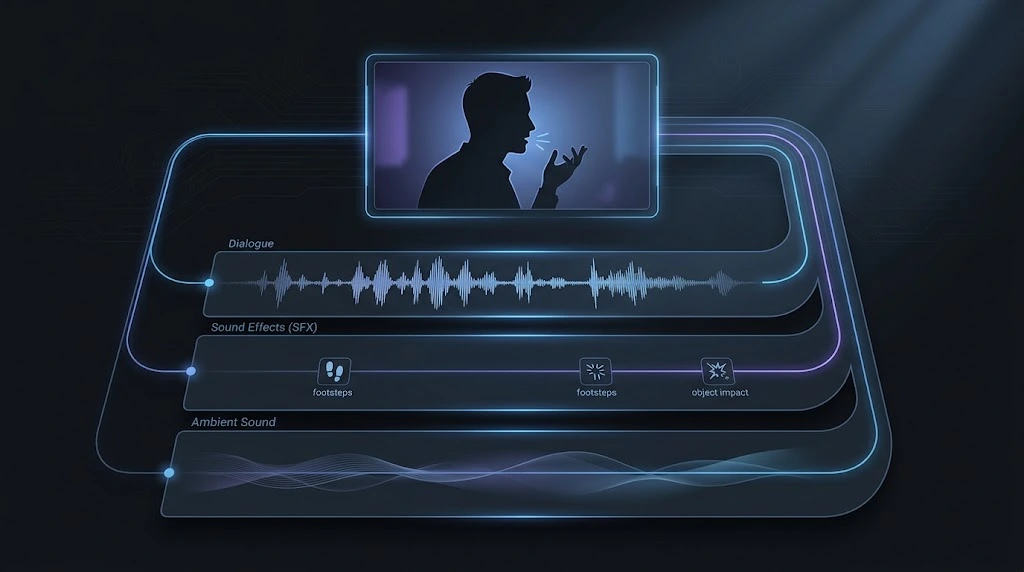
The important thing is to write audio as deliberately as you write cinematography. I use three distinct layers:
Dialogue: The detective quietly says, "We only get one chance." SFX: Rain taps against the windshield. A distant car horn sounds from the intersection. Ambient sound: Low city traffic, soft interior ventilation, occasional tires passing over wet asphalt.Notice that I do not write something vague like “make it sound cinematic.” That tells the model almost nothing. I specify the source, character, distance, and atmosphere. I also keep dialogue short enough to fit naturally inside the shot rather than writing a speech that has to be compressed into a few seconds.
For two-person dialogue, attribution matters. I identify who speaks before the quotation and describe delivery when it changes the meaning.
Medium two-shot inside a dim underground archive. An older archivist turns toward a younger researcher and speaks quietly, "That symbol was here long before the city." The researcher looks from the tablet to the wall, visibly unsettled. Soft tungsten practical lighting, deep shadows, restrained cinematic realism. Dialogue is intimate and natural. SFX: paper rustling, a wooden drawer sliding open, faint footsteps in the distant corridor. Ambient sound: low room tone, subtle ventilation, occasional building creaks.I also recommend thinking about audio spatially. A nearby object should sound nearby. A distant siren should feel distant. Footsteps should respond to the surface. Wind should match the environment. These details turn generated audio from background noise into part of the storytelling.
One practical limitation is timing. I design each generation around the actual clip length available in the interface. That means dialogue should be concise, actions should be physically achievable inside the shot, and important visual beats should happen early enough that the final moment is not wasted.
Google Veo 3.1 vs. Runway Gen-3 Quick Reference
Runway Gen-3 is still useful to study because it represents an earlier generation of AI video prompting and introduced many creators to structured camera and motion descriptions. That makes it a useful reference point when learning how prompting strategies have changed.
I wouldn’t approach both models with an identical prompt, though. The general principles transfer, but each model has its own capabilities and preferred workflow. Veo 3.1 puts particular emphasis on cinematic direction combined with generated audio, while Gen-3 became well known for visual prompting and motion control.
| Area | Google Veo 3.1 | Runway Gen-3 |
|---|---|---|
| Prompt emphasis | Cinematography, subject, action, context, style, audio | Visual description, subject motion, camera movement |
| Native generated audio | Yes | Not a core Gen-3 capability |
| Camera prompting | Strong | Strong |
| Motion prompting | Strong | Strong |
| Best prompting lesson | Think like a cinematographer and sound designer | Separate visual information from motion information |
The most important lesson isn’t choosing one model based on a feature checklist. I care more about whether my prompting method remains transferable. Clearly describe the scene, define the subject’s action, control camera movement, specify the visual style, and remove ambiguity. Then adapt that structure to the model you’re actually using.
- Veo 3.1: Particularly useful when synchronized audio is part of the creative brief.
- Runway Gen-3: A useful reference for understanding explicit motion and camera prompting.
- Transferable skill: Treat every generation as a directed shot rather than a generic text-to-video request.
- Best practice: Build reusable prompt structures instead of memorizing isolated “magic prompts.”
Google Veo 3 Prompt Engineering with Structured JSON and Promptsera
JSON is one of the most misunderstood topics in Veo prompting. I’ve seen people build enormous JSON objects and assume that Veo has a hidden JSON language. It doesn’t work that way. JSON is best treated as a planning or API-organization format, while the creative instruction remains the actual text prompt.
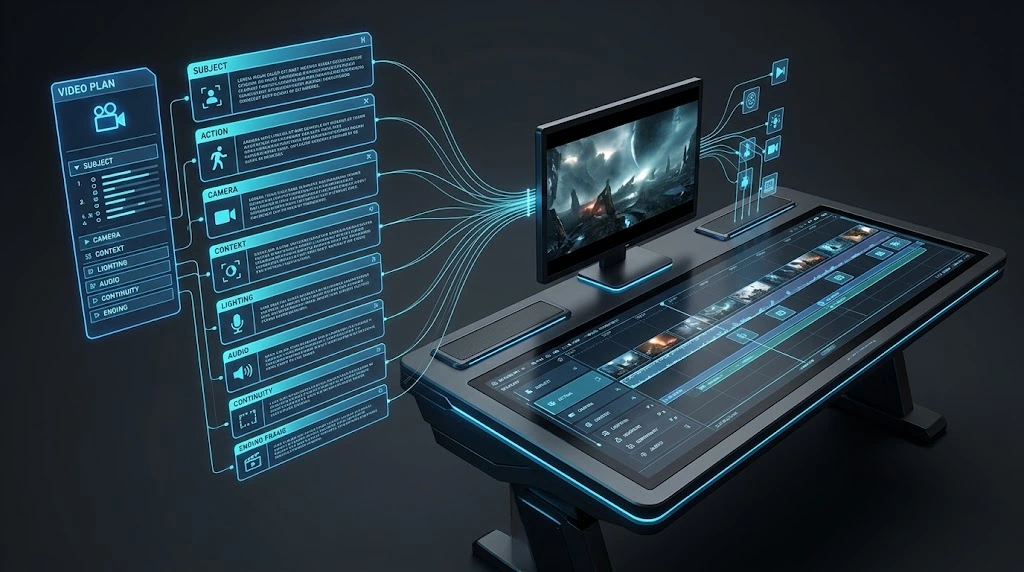
That said, JSON is extremely useful as a planning layer. I use it to organize a complex shot before converting it into natural-language instructions. This is especially useful for product ads, multi-shot sequences, character continuity, and scenes with simultaneous camera, action, lighting, and audio requirements.
{ "shot": { "subject": "A vintage motorcycle parked outside a roadside diner", "action": "The rider removes her helmet and looks toward the neon sign", "camera": "Slow lateral tracking shot from left to right, ending in a medium close-up", "framing": "Begin wide, finish medium close-up", "lighting": "Blue dusk light mixed with warm red neon", "environment": "Quiet desert highway, slightly wet pavement, light mist", "style": "Photorealistic neo-noir commercial", "audio": { "dialogue": "None", "sfx": "Motorcycle engine cooling, distant highway traffic, light wind", "ambience": "Low roadside hum and subtle neon electrical buzz" }, "continuity": "Keep motorcycle design, rider clothing, lighting direction, and diner architecture consistent" } }The advantage is not that this JSON magically improves Veo. The advantage is that I can audit the shot before generating it. Did I define the camera? Did I define movement? Is the audio compatible with the action? Does the lighting make physical sense? Is there a contradiction between the beginning and ending?
This is also where I find prompt generators useful. Promptsera’s dedicated Google Veo 3 prompt generator is designed around cinematic structure, camera movement, mood, timing, and video-specific details. Its workflow is useful when I want to turn a rough concept into a structured Veo prompt before refining it myself.
For image-led workflows, I combine that with Promptsera’s Google Imagen prompt generator when I need to design a consistent reference frame before animating it.
My production workflow looks like this:
- Concept: Write one sentence describing the shot.
- Structure: Break it into camera, subject, action, context, style, and audio.
- Continuity: Add only the identity and environmental details that must remain fixed.
- Timing: Make sure the action can realistically happen inside the available clip duration.
- Generation: Create the cleanest version first, then adjust one variable at a time.
- Iteration: Change the weakest part of the prompt instead of rewriting everything after every failed render.
That last point matters. Randomly rewriting the entire prompt makes it impossible to learn what caused the improvement or failure. I prefer controlled iteration: first fix the camera, then the action, then continuity, then audio. Treat each generation as a test, not a lottery ticket.
For broader prompt work across models, Promptsera’s Universal AI Prompt Generator is also useful when I want to start with a rough concept and decide which video-specific controls belong in the final instruction.
FAQ
What is the best prompt structure for Google Veo 3?
I use a structure based on cinematography, subject, action, context, and style and ambiance, with audio and continuity details added when needed. The goal is to make every important production decision explicit without turning the prompt into an unreadable wall of adjectives.
How do I write camera movement prompts for Veo 3?
Describe one primary camera movement clearly, then define framing and lens behavior. Useful terms include dolly, tracking shot, crane shot, slow pan, POV, close-up, wide shot, and shallow depth of field.
How do I stop Veo 3 from adding background music?
Make the desired audio explicit and suppress the unwanted element directly. For example: “Natural location audio only. No background music. No cinematic score.” I prefer targeted negative instructions over enormous generic negative prompts.
Can Veo 3.1 generate sound effects and ambient audio?
Yes. Veo 3.1 supports generated sound as part of the video workflow, including dialogue, sound effects, and environmental audio. I recommend writing each audio layer explicitly rather than relying on a generic instruction such as “cinematic audio.”
Does Veo 3 require JSON prompts?
No. JSON is best treated as an organizational or API-request format rather than a required creative syntax. It can be useful for planning complex shots before translating the structure into natural-language video direction.
The Verdict
The biggest lesson I’ve learned from google veo 3 prompt engineering is that better results come from better direction, not from stuffing more adjectives into the prompt. A strong Veo prompt has a clear hierarchy: define the shot, define the subject and action, lock down the environment, establish the visual language, and then direct the sound. When continuity matters, carry the important identity and environmental anchors from shot to shot.
I also believe the best workflow is iterative rather than mysterious. Start with a clean structure, generate, identify the weakest instruction, and improve that one variable. When you need to move faster, use the Promptsera Veo 3 Prompt Generator to turn a basic idea into a structured cinematic prompt, then refine the result until every camera, motion, continuity, and audio decision serves the shot.




)