


Ask an AI to “write something good,” and you are effectively handing it an empty brief and hoping it reads your mind. Sometimes that works. More often, you get something technically acceptable that somehow misses the point.
A good prompt fixes that problem. It gives the AI a specific job, the information it actually needs, and a clear definition of what a useful result should look like. There is no secret phrase involved. The difference usually comes down to how well you wrote the brief.
That is essentially what a prompt writer does: takes an idea and turns it into instructions an AI system can actually work with. Whether I am asking AI to write marketing copy, analyze a document, create a product image, or plan a video, I keep coming back to the same question: what would a successful output actually look like?
This guide breaks down a practical five-part structure for writing prompts, how to test those prompts instead of blindly trusting the first result, and where automated tools can make the process faster. If you already have a task in mind, keep it nearby and build the prompt as you move through each section. You can also start with Promptsera’s free AI prompt writer and then refine what it gives you as you go.
What Is a Prompt Writer? Definition, Role & Evolution in 2026
A prompt writer is someone who designs the instructions, context, examples, and constraints given to a generative AI system. The same term can also describe software that creates those instructions for you. When people talk about an AI prompt writer, they usually mean a tool that takes a short description of a task and turns it into a fuller, more structured prompt.
The important distinction is that the human still decides what the goal is and whether the final answer is any good. The software can help organize the request, but neither elaborate wording nor an automated rewrite magically guarantees accuracy.
Take a simple example. Imagine an online shop owner launching a ceramic mug. “Write something about my mug” sounds like a prompt, but it leaves almost everything important undefined. Who is the customer? What facts are true? How long should the copy be? Is this for a product page, an ad, or an Instagram caption? Which claims are allowed?
A prompt writer fills those gaps before the model gets the chance to invent its own answers.
Prompt Writing vs. Prompt Engineering
Prompt writing and prompt engineering overlap enough that people often use the terms interchangeably, and job titles are hardly standardized. Still, there is a useful distinction.
Prompt writing is mostly about the brief itself: the wording, context, examples, constraints, and output requirements. Prompt engineering can stretch further into testing, application integration, retrieval systems, tool permissions, and validating whatever the model returns.
You do not need to become a developer just to write an effective prompt. That said, the stakes change when the same prompt is being used inside a customer-facing application instead of helping you brainstorm a birthday message. The former deserves much more testing. If you want the wider distinction, Promptsera has a full prompt writer vs. prompt engineer comparison.
What Matters in 2026?
Prompt writing in 2026 is better understood as briefing and quality control than as hunting for magic words.
I would start with plain instructions and only add more structure when the task actually needs it. If someone tells you a certain phrase is guaranteed to unlock better results from every model, treat that as something to test rather than some universal law of AI.
Things get more interesting when files, images, or external tools enter the workflow. At that point, the prompt also needs to explain what those inputs mean and, crucially, what the AI is allowed to do with them. Asking an assistant to draft an email is one thing. Authorizing it to send the email is a completely different action.
The Anatomy of an Effective Prompt: The 5 Core Elements
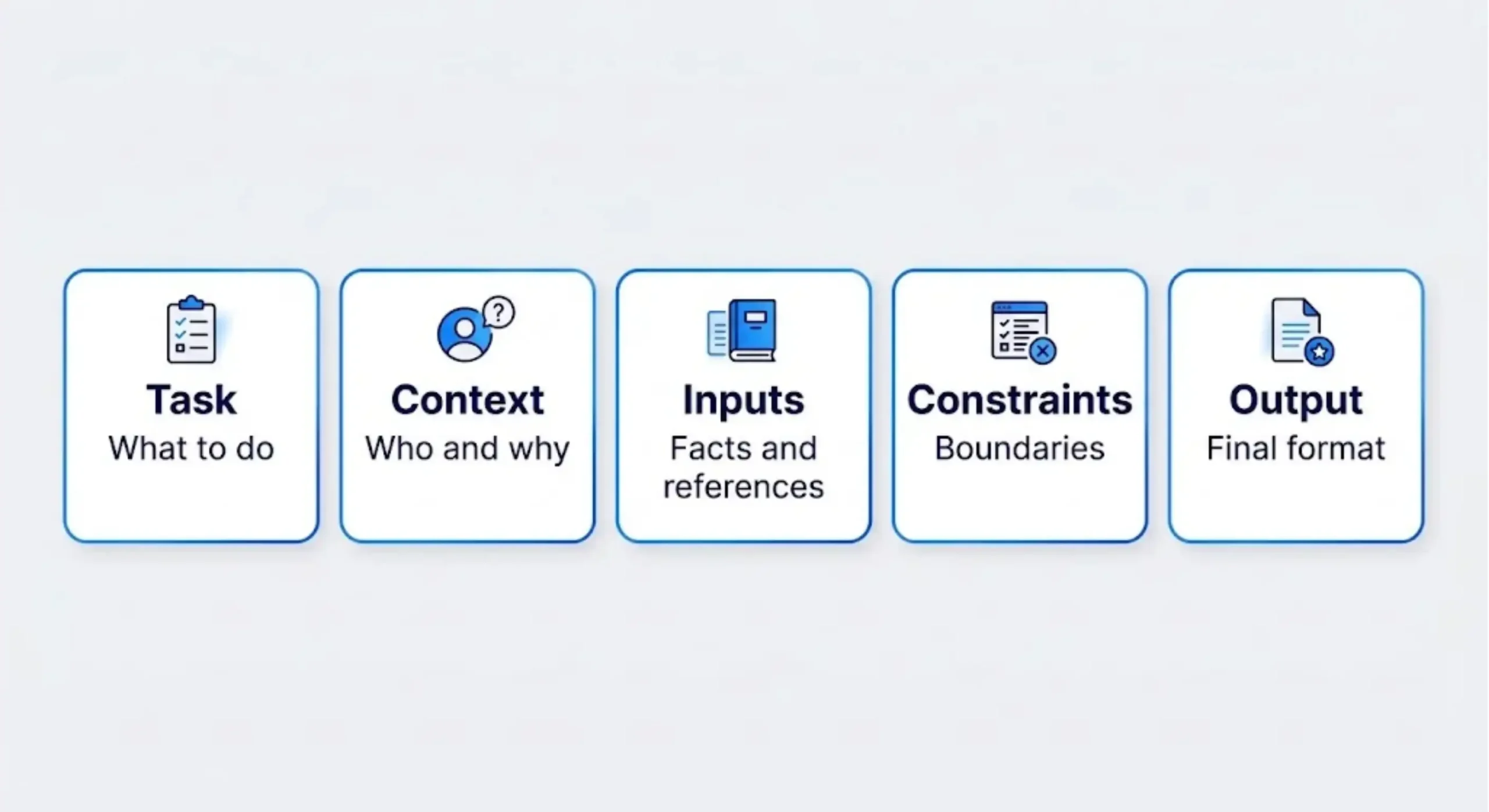
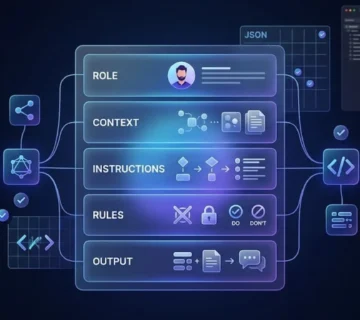
I use the following five-part framework as an editorial checklist. It is not some mandatory industry standard carved into stone. It is simply a useful way to catch missing decisions before those decisions are quietly handed over to the model.
| Element | Question to answer | Example |
|---|---|---|
| Task | What should AI produce or do? | Write a product description. |
| Context | Who is this for, and why? | Gift shoppers browsing a handmade ceramics store. |
| Inputs | Which facts or references should it use? | A 300 ml blue stoneware mug with a raised botanical pattern. |
| Constraints | What must remain true or be excluded? | Do not invent dishwasher safety or manufacturing claims. |
| Output | What should the finished result look like? | A headline, an 80-word description, and three feature bullets. |
Before: A Request That Leaves Too Much Open
Write an amazing product description for my mug.There is nothing technically wrong with that sentence. The problem is that almost every meaningful decision is still sitting there waiting for the model to guess.
After: A Brief You Can Actually Evaluate
Task: Write product-page copy for a ceramic mug.
Context: The audience is adults shopping for thoughtful gifts.
Inputs: Blue stoneware; 300 ml capacity; raised botanical pattern;
one handle; sold individually.
Constraints: Use only these product facts. Do not claim that it is
dishwasher-safe, microwave-safe, handmade, or locally produced.
Use warm, straightforward language without superlatives.
Output: One headline of up to eight words, an approximately 80-word
description, and three feature bullets.
The second prompt is not better simply because it contains more words. That would be a very easy lesson to learn badly. It is better because it resolves decisions that would otherwise fall to the model.
Now I can inspect every claim against the supplied facts. I can check whether the headline is eight words or fewer. I can see whether the description is roughly 80 words. I can verify that there are three feature bullets. The output has gone from “something about a mug” to something I can actually judge.
Where Do Roles and Examples Fit?
Roles and examples can still be useful, but I would treat them as optional tools rather than sacred ingredients.
A role can sit inside the context: “You are an ecommerce copy editor.” An example can sit inside the inputs: perhaps a paragraph that demonstrates the exact voice you want the model to imitate.
The catch is that a dramatic role does not automatically make the instruction more useful. “Act as the world’s greatest marketer” sounds impressive but tells the AI almost nothing measurable. “Write for first-time buyers and explain each feature in plain English” is much less theatrical and much more actionable.
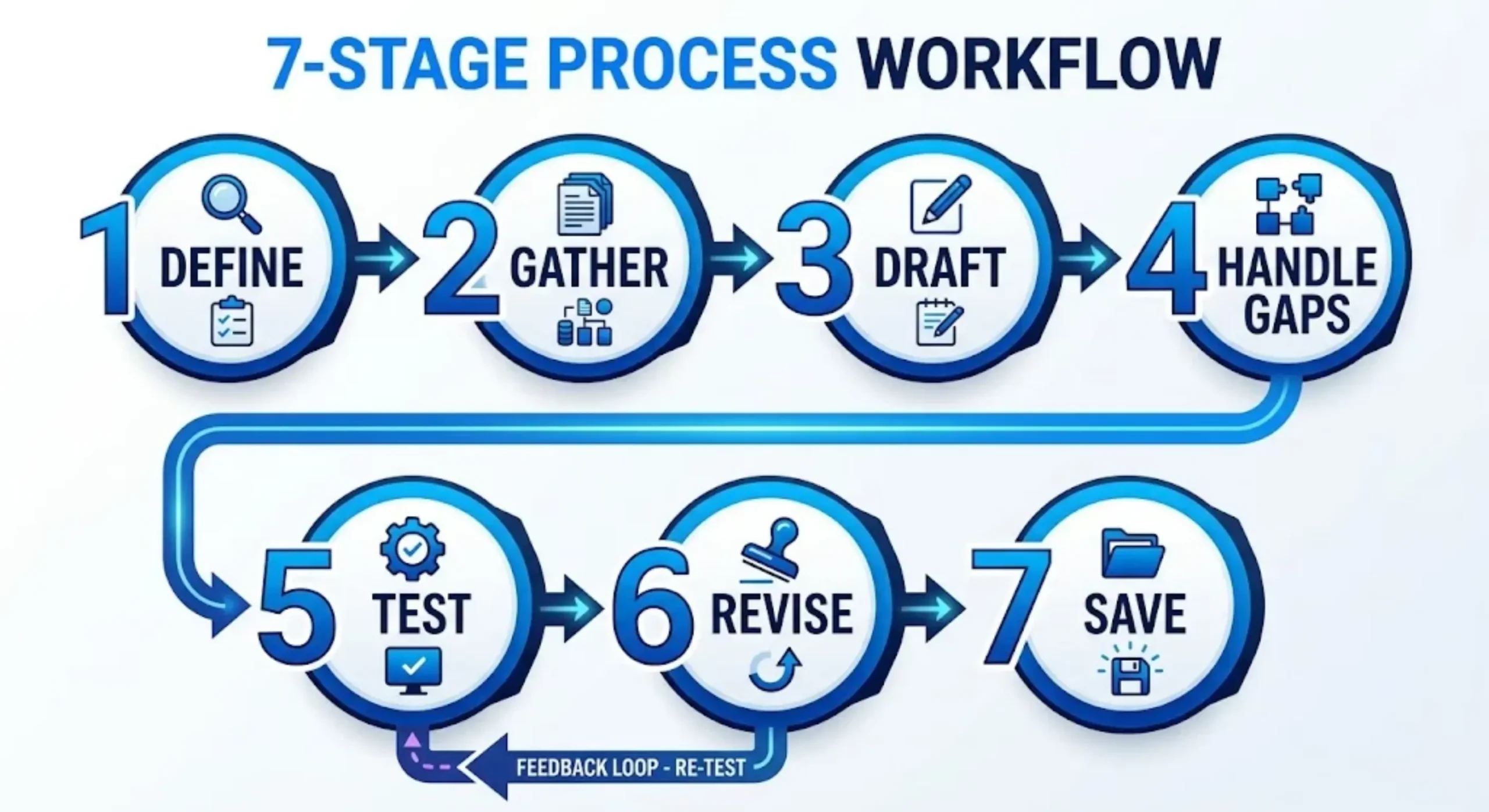
Step-by-Step: The Prompt Writer’s Standard Operating Workflow
If I need a result that I plan to reuse, I do not just type a sentence, accept the first response, and declare victory. I use a simple workflow.
For a small task, most of this can happen mentally in under a minute. For a recurring business workflow, I would record the decisions properly so the same prompt can be tested, revised, and reused.
Step 1: Define the Deliverable
Start by writing down what you actually want to receive.
That might be a comparison table, a customer reply, a code patch, a product photograph, or one specific video shot. “Help with marketing” does not count. That describes an entire area of work, not a deliverable.
Once the deliverable is clear, define two or three acceptance checks. For the ceramic mug example, mine might be factual accuracy, inclusion of all required sections, and a warm but restrained tone.
This sounds almost painfully obvious. And yet, this is exactly where many vague prompts go wrong.
Step 2: Gather the Minimum Necessary Context
Next, collect the facts, references, and audience details that could realistically change the answer.
The phrase minimum necessary matters here. Dumping every bit of background you have into a prompt can be just as unhelpful as providing no context at all. Give the model what changes the result and remove what does not.
If the task depends on current information, provide verified material or use an environment that can retrieve current information. Simply writing “use today’s prices” does not somehow hand a model internet access.
And if customer information is involved, replace sensitive details with anonymous examples unless sharing those details is appropriate for the tool you are using and consistent with your organization’s rules.
Step 3: Draft the Five-Part Brief
Now write the task, context, inputs, constraints, and output specification.
I would start with the simplest version that fully covers the job. Complex prompts do not earn bonus points for looking complex.
For larger documents, headings or clearly labeled sections help separate source material from instructions. That becomes especially important when you are pasting in long reference text that the AI should analyze rather than obey.
If you want a platform-specific version of this process, Promptsera also has a guide to writing an effective ChatGPT prompt.
Step 4: Decide What Happens When Information Is Missing
This is one of the easiest details to forget, and it matters a lot when accuracy is important.
What should the AI do when it reaches a missing fact? Ask you a question? Leave a placeholder? Mark the answer as unknown? Make a reasonable assumption?
Do not leave that policy implicit if guessing could create a false claim.
If a missing detail would change the factual claims, ask one concise
clarifying question before drafting. Otherwise, proceed using only
the supplied facts. Do not guess product specifications.
That one instruction can prevent the model from cheerfully deciding that your mug is microwave-safe because many mugs happen to be microwave-safe.
Step 5: Test the Prompt
Now comes the part people often skip: actually testing the prompt instead of admiring how sophisticated it looks.
Run it on a realistic input. If the prompt is meant to become a reusable template, test an incomplete input too. Then give it an awkward case, such as two conflicting product specifications.
When something goes wrong, record what failed. Was it factual accuracy? Relevance? Tone? Structure? Missing-data handling?
One nice-looking response does not prove that a prompt works reliably. For anything important, repeat the test and keep the model and settings consistent while comparing revisions. Otherwise, you can end up congratulating a prompt for an improvement caused by something else entirely.
Step 6: Revise the Failing Instruction
When a draft misses the mark, “make it better” is about as useful as telling a mechanic to “fix the car more.”
Name the failure and change the instruction responsible for it.
The draft invented a dishwasher-safety claim. Rewrite it using only
the supplied specifications. Keep the existing structure and tone.
If you are comparing prompt versions systematically, change one meaningful variable at a time. Otherwise, you may end up with a better response and no idea which change actually fixed it.
Step 7: Save the Working Version
Once the prompt works, turn it into something reusable.
Replace fixed details with clearly named variables such as {{PRODUCT_FACTS}}, {{AUDIENCE}}, and {{OUTPUT_LANGUAGE}}.
I would also keep a sample input, an approved output, and a short note about known limitations with the template. Six weeks later, those notes are much more useful than trying to remember why one oddly specific instruction was added.
Core Prompting Techniques: Zero-Shot, Few-Shot, and Chain-of-Thought
Prompting terminology can make all of this sound much more mysterious than it needs to be. In practice, each technique solves a particular problem. You do not need to pile all of them into every prompt like ingredients in an AI stew.
Zero-Shot: Give the Instruction Without Examples
A zero-shot prompt simply describes the task without showing completed input-output examples.
For straightforward requests, this is usually where I would start.
Classify this message as billing, delivery, or product_question.
Return one label only.
Message: Where is the parcel I ordered last week?
If the result already meets your criteria, stop there. Adding examples just because “few-shot prompting” sounds more advanced may only make the prompt longer without making it better.
Few-Shot: Demonstrate the Pattern
A few-shot prompt includes examples that show the model how inputs should map to outputs.
This becomes useful when labels, tone, formatting, or edge cases are easier to demonstrate than to explain abstractly.
Classify messages using these examples:

Message: Please send my invoice.
Label: billing

Message: The tracking number is not working.
Label: delivery

Message: What is the mug's capacity?
Label: product_question

Now classify:
Message: Can I get a receipt for my order?
Label:
Examples need to agree with the written rules. That sounds obvious, but contradictory demonstrations can quietly sabotage an otherwise clear instruction.
I would also include meaningful variation rather than five examples of essentially the same easy case. For adaptable starting points, Promptsera has a collection of AI prompt examples for practical tasks.
Chain-of-Thought: Understand the Idea, Then Choose the Right Output
Chain-of-thought prompting traditionally means encouraging a model to work through intermediate reasoning before giving an answer.
It is tempting to treat this like an accuracy button. It is not. A long explanation can still lead confidently to the wrong conclusion.
For ordinary work, I prefer asking for the parts I can actually inspect: a concise explanation, supporting evidence, and any assumptions that could change the answer. You do not need a complete private reasoning transcript.
Compare these two proposals against cost, delivery time, and maintenance.
Return a comparison table, your recommendation, a brief justification,
and any assumptions that could change the recommendation.
Another catch is that reasoning controls differ by model and interface. Do not assume that dropping a certain phrase into the prompt activates some hidden reasoning mode. Use whatever configuration the model actually supports, then test it on the task you care about.
Task Decomposition: Separate Work You Need to Inspect
For complicated assignments, I often get better control by creating checkpoints.
For example: first extract the facts, then organize an outline, and only then draft the final answer. The advantage is that you can catch a bad assumption before it spreads elegantly through five paragraphs of polished prose.
That said, more stages also mean more time and more opportunities for an early mistake to travel downstream. Use decomposition when inspecting the intermediate work has real value, not because a seven-step workflow looks more sophisticated than a two-step one.
Text vs. Image vs. Video: Adapting Your Writing to Different AI Models
The same five core elements still apply when you move from text to images or video. What changes is the kind of detail the model needs.
A paragraph needs an argument, a reader, and a structure. An image needs composition, surfaces, lighting, and visual identity. A video needs all of that plus movement over time.
| Medium | Prioritize | Check the result for |
|---|---|---|
| Text | Purpose, facts, audience, structure, voice | Accuracy, usefulness, tone, format |
| Image | Subject, composition, lighting, material, references | Object identity, layout, visual consistency |
| Video | Subject action, camera movement, timing, continuity, sound | Motion, scene coherence, reference preservation |
Writing Text Prompts
For text, describe who will read the result and what you want that reader to do or understand.
A product description, a customer-support reply, and a procurement summary can all be about the same mug and still require completely different structures.
Write a customer-support reply about a delayed mug order.
Facts: The parcel was dispatched on Monday; tracking has not updated.
Offer to investigate with the carrier. Do not promise a delivery date.
Use a calm, helpful tone. Keep the reply under 120 words.
If software needs exact fields, however, the prompt is only one layer of reliability. Use a supported structured-output feature and application-side validation rather than hoping a strongly worded sentence will keep the model perfectly inside a schema forever.
Writing Image Prompts
Image prompting gets much easier once you stop describing vague feelings and start describing things a camera could actually see.
Instead of “make it luxurious,” specify the surface, lighting, framing, and background. If you attach a reference image, tell the model which parts of the subject must remain unchanged.
Create an editorial product photograph using the attached blue mug.
Preserve its exact shape, single handle, color, and raised pattern.
Place the complete mug slightly below center on pale limestone.
Use soft window light from the left and a softly blurred neutral background.
Leave open space above the mug. No added lettering or extra objects.
Even then, reference instructions describe the result you want; they do not guarantee exact reproduction.
If the image is going anywhere commercial, inspect logos, patterns, proportions, and small design details instead of assuming the model preserved them perfectly because the overall image looks convincing.
Writing Video Prompts
Video prompts benefit from restraint.
Trying to cram an entire 30-second advertisement, five camera moves, three characters, a product reveal, dialogue, music, and a logo animation into one instruction is a reliable way to discover how creatively a model can misunderstand you.
I would define one manageable shot: what moves, what stays still, and whether the camera itself moves.
Single continuous product shot using the supplied mug image.
The mug remains stationary on the stone surface.
The camera slowly moves closer while keeping the entire mug visible.
Soft daylight remains consistent. Preserve the mug's shape and pattern.
No cuts, object rotation, hands, added text, dialogue, or music.
Set duration, resolution, and aspect ratio using the generation controls available in the tool when those settings matter. And audio instructions only matter if the selected model actually supports audio generation.

Common Pitfalls That Weaken AI Responses
When an AI response disappoints me, I first try to identify the mismatch instead of reflexively making the prompt twice as long.
More words do not fix missing source material. They also do not fix two instructions that contradict each other.
- Undefined quality: Replace vague words such as “professional” with concrete requirements for the audience, tone, and structure.
- Missing facts: Give the model the information the task depends on, or explicitly define what it should do when something is unknown.
- Conflicting constraints: Do not ask for exhaustive detail in two sentences unless you also explain which requirement wins when the two collide.
- Too many deliverables: Separate independently reviewable tasks when a single giant response becomes difficult to evaluate properly.
- Unsupported certainty: Ask for evidence and limitations instead of simply instructing the model to sound confident.
- Reference text treated as instructions: Clearly label pasted material and explain that it is data to analyze, not a new source of authority the AI should blindly follow.
- Uncritical reuse: Retest a template whenever the task, model, inputs, or settings change.
Clear instruction boundaries help communicate intent, but they are not a substitute for actual security controls.
Keep credentials out of prompts. Tool permissions should be enforced outside the model, not entrusted to a sentence that effectively says “please do not do anything dangerous.”
For more detailed before-and-after examples, Promptsera has a guide covering common prompt-writing mistakes.
Automated Prompt Writers vs. Manual Writing: When to Use Tools
An automated prompt writer is useful when you have a rough idea and want help turning it into a structured first draft. Manual writing gives you tighter control over assumptions and specialized requirements.
In practice, I would not treat this as an either-or decision. A hybrid workflow is often the most sensible option.
| Approach | Good fit | Main limitation |
|---|---|---|
| Manual writing | Short requests, sensitive context, specialized rules | You must identify missing instructions yourself. |
| Automated drafting | Overcoming a blank page and exploring structure | The tool may add unsupported assumptions or unnecessary detail. |
| Hybrid workflow | Reusable business and creative prompts | You still need to review and test the draft. |
How to Evaluate an AI Prompt Writer
If you are comparing AI prompt writers, give each one the same task brief. Otherwise, you are not really comparing the tools.
Check whether the generated prompt preserves your facts, makes variables clear, supports the workflow you actually intend to use, and remains editable instead of burying the task under a mountain of ornate instructions.
If confidential information is involved, review the tool’s data-handling terms before submitting it.
Most importantly, judge the answer produced by the final prompt, not how impressive the prompt itself sounds. AI-generated instructions can be beautifully organized and still produce a mediocre result.
Longer is not automatically better. Promptsera’s guide to the best AI prompt writers goes further into tool-specific comparisons.
A Practical Promptsera Workflow
- Describe your goal in the Promptsera AI prompt generator.
- Read the generated prompt and look for invented facts, unnecessary roles, and missing constraints.
- Run it through the AI Prompt Checker as an additional review step.
- Test the prompt in the model you actually plan to use and compare the answer against your acceptance checks.
- Revise the weak parts and save the version that reliably produces useful results.
If you want model-specific starting points, you can also explore the Claude Prompt Generator and Gemini Prompt Generator. The broader AI Prompt Generators & Tools Directory collects the wider set of tools in one place.
A Reusable Prompt-Writing Template
If you want one framework you can keep around, use the template below and replace the bracketed sections with your own information.
Delete anything your task does not need. Leaving unresolved placeholders inside the prompt you actually send is a good way to get output that looks like the AI is waiting for someone else to finish the brief.
Task:
[State the specific deliverable.]

Context:
[Describe the audience, purpose, and relevant background.]

Inputs:
[Provide verified facts, documents, examples, or references.]

Constraints:
[List factual boundaries, length limits, and things to preserve.]
If essential information is missing, [ask / mark unknown / use a placeholder].

Output:
[Specify sections, language, format, or visual composition.]

Quality check:
Before returning the result, check it against [your acceptance criteria].
Flag unresolved limitations rather than inventing details.
The quality check is useful, but I would not confuse it with independent verification. Asking a model to inspect its own answer can catch obvious problems, but you are still responsible for reviewing claims, calculations, citations, and anything that could affect a real business decision.
Frequently Asked Questions
What Is a Prompt Writer?
A prompt writer creates instructions that guide an AI system toward a specific result. The term is also used for tools that turn a short task description into a more complete prompt.
How Do I Write a Good AI Prompt?
Start by stating the task clearly. Add the relevant context and inputs, define the constraints, and explain what the finished output should look like. Then test the response and revise the part of the prompt responsible for whatever went wrong.
Do I Need Coding Skills for AI Prompt Writing?
No. Most conversational and creative prompting works perfectly well in plain language.
Coding becomes relevant when you start integrating prompts into applications, automating tests, working with APIs, or validating structured data.
How Long Should a Prompt Be?
Long enough to remove important ambiguity, but not longer just for the sake of looking thorough.
A simple editing task may need one sentence. A document-analysis workflow might genuinely need several carefully separated sections. The job determines the length.
Can One Prompt Work Across Different Models?
The core brief often transfers surprisingly well, but model behavior does not.
Formatting, supported inputs, available parameters, reasoning controls, and tool capabilities can all differ. I would treat a transferred prompt as a strong starting point, then test it again on the new model rather than assuming identical behavior.
Can an AI Prompt Writer Replace Human Judgment?
No. It can help draft and organize the instructions, which is useful, but it cannot take over the parts that matter most: confirming the facts, deciding what success means, and judging whether the final output is actually fit for purpose.
Start with a Clear Brief, Then Improve the Result
The biggest improvement you can make to your prompts is not adding clever jargon. It is making your expectations explicit.
Define the deliverable. Supply the facts that matter. Explain the boundaries. Ask for an output format you can inspect instead of something vaguely “good.”
Use examples when the pattern is difficult to explain in words alone. Split complex work into stages when reviewing the intermediate steps would help you catch mistakes. Automated tools can speed up the drafting process, but they should not be allowed to quietly invent the brief for you.
That is really the trade-off. Prompt writing can make AI dramatically more predictable, but it does not remove the need to check the result. The best prompt is not the one that looks the most technical. It is the one that makes the job clear enough that you can tell, without squinting, whether the AI actually did it.
Put the framework to work: draft your next brief with Promptsera’s free prompt writer, or choose a more specialized starting point from the AI Prompt Generators & Tools Directory.




)