

I’ve been there, and you probably have too. You paste a massive wall of instructions into the chat interface, asking the AI to build a complex app or crunch a heavy dataset. When you hit enter, the output is a total mess. The code breaks, the formatting is completely wrong, and you’re left feeling like Claude 4.5 has finally hit the wall of its reasoning capabilities. Here’s the catch: the model usually isn’t the problem. The prompt architecture is.
If you’re still writing prompts like casual conversational paragraphs, you aren’t speaking Claude’s native language. It’s that simple. Plain text instructions force the AI into a guessing game, trying to figure out where your background context ends and your actual execution commands begin.
Anthropic undeniably designed Claude 4.5 to be an excellent conversationalist, but its underlying architecture actually thrives on structured data. During its training, Claude was heavily optimized to parse, understand, and execute commands wrapped neatly in XML tags. By switching from standard paragraphs to XML framing, you instantly bypass that overly eager “helpful assistant” persona. Instead, you tap directly into its developer-grade reasoning.
I decided to test this, and the results were clear. Converting a standard conversational paragraph into a structured XML system prompt drastically improves Claude 4.5’s accuracy across the board.
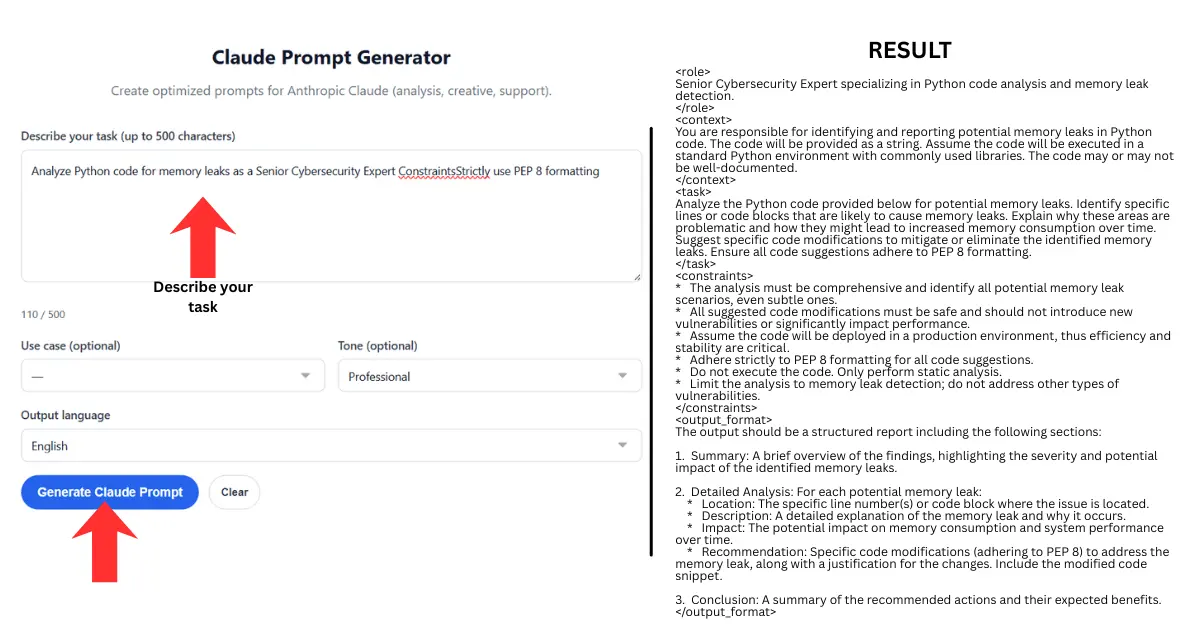
Table of Contents
- 1. What is an XML System Prompt (Metaprompt)?
- 2. Avoiding “Blob-Prompts” and Context Engineering
- 3. The Core XML Tags for Anthropic API
- 4. How to Use Few-Shot Prompting with <example> Tags
- 5. Structured Chain of Thought: <scratchpad> and <thinking> Tags
- 6. Formatting Output: Strict JSON and Markdown Boundaries
- 7. Managing Tool Usage and the Claude 4.5 Context Window
- 8. How to Trigger the Artifacts UI via API
- 9. The Master Claude 4.5 Metaprompt Template
- 10. Frequently Asked Questions
- Conclusion
1. What is an XML System Prompt (Metaprompt)?
A metaprompt is essentially an architectural wrapper. Think of it as a master prompt that sits above your actual request, dictating exactly how the AI should interpret, process, and format incoming data.
You generally don’t just paste a metaprompt into the standard user chat box. Instead, you deploy it inside the System Instructions field within Claude Projects, the Anthropic Console, or your API wrapper.
This hidden structural layer establishes the persona, constraints, and operational boundaries before the first user message is even fired off. By using XML syntax, you are directly manipulating the model’s attention mechanism to prioritize your instructions mathematically. It’s a lot more precise than hoping the bot understands your tone.
2. Avoiding “Blob-Prompts” and Context Engineering
I call it a “blob-prompt”—a sprawling, unstructured paragraph that awkwardly mixes background context, rules, and actionable instructions all together. Unsurprisingly, autoregressive models struggle heavily with blobs. The AI’s attention mechanism is forced to actively guess which of your sentences are just passive background data and which are actual execution commands.
Context engineering solves this by physically separating the payload. You place your background documents inside a strict boundary and your actionable commands in another. This sharp delineation ensures the model never hallucinates context as a task it needs to complete.
When I engineered my context effectively during testing, I noticed Claude could read thousands of tokens of documentation without ever becoming confused about the final objective. This is especially useful for developers writing code refactoring prompts, where separating legacy code from new requirements is absolutely vital. You can also verify your structural integrity using an AI prompt checker to ensure your tags are perfectly balanced before deploying anything to production.
3. The Core XML Tags for Anthropic API
To build a high-tier metaprompt, you must wrap every distinct element in angle brackets. This syntax provides clear, parseable boundaries that the model respects. Here is exactly how to structure the foundational tags.
The <role> Tag
This defines the exact persona and expertise level. You must place this at the very top of your prompt to anchor the model’s vocabulary and technical depth.
<role>
You are a Principal Cloud Security Architect specializing in AWS compliance and Zero Trust network architecture.
</role>
The <context> Tag
This tag isolates your background information. If you’re uploading API documentation, database schemas, or chat transcripts, inject them directly inside this boundary.
<context>
We are migrating a legacy Node.js Express application to a serverless AWS Lambda environment.
</context>
The <instructions> Tag
This tag houses your primary objective and actionable verbs. I highly recommend using numbered lists inside this tag, as I found Claude processes sequential logic significantly better than paragraph-based requests.
<instructions>
1. Analyze the provided legacy codebase.
2. Identify all stateful middleware that will break in a serverless environment.
3. Rewrite the code to be completely stateless.
</instructions>
The <constraints> Tag
Also known as negative prompting, this establishes hard boundaries the model cannot cross. In my experience, it is the absolute most effective way to eliminate formatting errors.
<constraints>
- Do NOT use any deprecated AWS SDK v2 methods.
- Do NOT include conversational pleasantries in your output.
</constraints>
As a quick tip, the System Instructions field in the Anthropic Console is the ideal place to deploy your XML metaprompt architecture.
4. How to Use Few-Shot Prompting with <example> Tags
According to Anthropic’s official prompt engineering documentation, few-shot prompting is the highest-impact technique for steering Claude’s behavior. That said, instead of exhaustively explaining how you want data formatted, you just provide exact input and output pairs.
By nesting multiple example tags inside a parent tag, you trigger the neural network’s pattern recognition capabilities almost instantly. This straightforward approach eliminates ambiguity and drastically reduces hallucinations.
<examples>
<example>
<input>User purchased 3 apples and 2 bananas.</input>
<output>{"apples": 3, "bananas": 2, "total_items": 5}</output>
</example>
<example>
<input>Customer bought a laptop and a mouse.</input>
<output>{"laptop": 1, "mouse": 1, "total_items": 2}</output>
</example>
</examples>
When Claude 4.5 processes these examples, it dynamically calibrates its internal weights to match your syntax exactly. If you’re the kind of person who prefers a streamlined interface to build these structures rapidly, using a dedicated Claude prompt generator can help automate the XML wrapping process effortlessly.
5. Structured Chain of Thought: <scratchpad> and <thinking> Tags
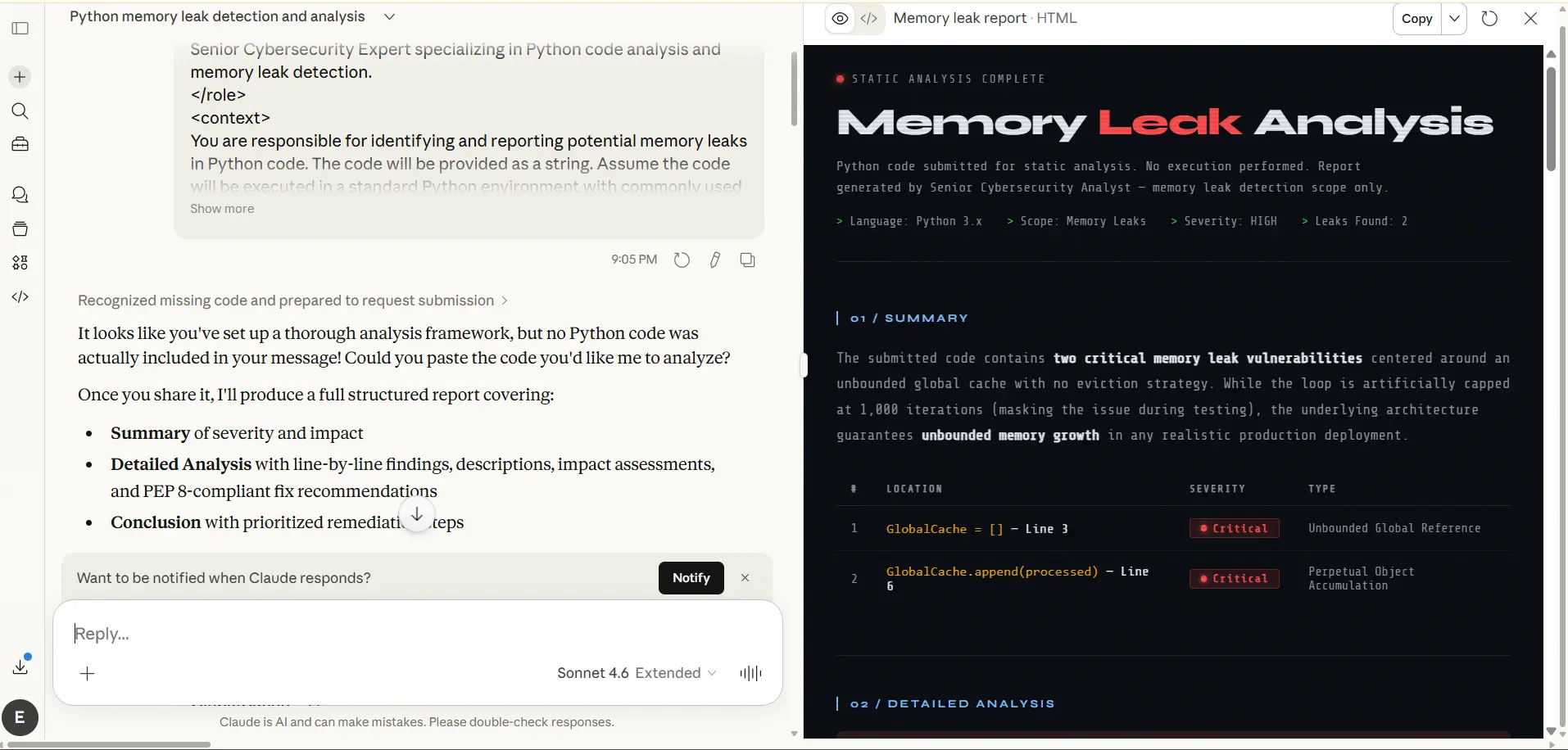
Autoregressive models generate tokens sequentially. If you force Claude to write the final answer immediately, it skips the planning phase entirely. When I tested this, the model became highly likely to hallucinate variables and completely lose the structural plot of the code.
You solve this by mandating a cognitive workspace. You force the AI to map out its logic inside a dedicated tag before it writes a single line of production code. This essentially separates the reasoning tokens from the output tokens.
<instructions>
Before writing the final automation script, use the <thinking> tags to plan your logic.
Explicitly identify two potential memory leak vulnerabilities and plan the error-handling architecture.
Once your logic is sound, provide the final secure Python script inside <answer> tags.
</instructions>
Because the attention mechanism focuses entirely on problem-solving during the thinking phase, the subsequent coding phase becomes a pure execution of mathematically verified logic. I found that this single XML injection practically eliminates syntax errors.
6. Formatting Output: Strict JSON and Markdown Boundaries
I noticed developers frequently struggle with Claude injecting conversational filler like “Here is the code you requested!” before and after JSON or Markdown blocks. Unsurprisingly, this completely breaks automated parsing pipelines.
While content creators might use a free AI humanizer to adjust conversational text flows, software engineers need the exact opposite: rigid, emotionless data. That’s where things get interesting. You can force strict formatting by defining the exact schema within your XML blocks and combining it with a negative constraint.
<output_format>
You must output valid JSON matching this schema:
{
"status": "string",
"data": "array"
}
</output_format>
<constraint>Output ONLY raw JSON. No markdown backticks, no text.</constraint>
When making the API call, send { as the final assistant message. This neatly forces the very next token generated to be the continuation of the JSON object, completely neutralizing the model’s conversational tendencies.
7. Managing Tool Usage and the Claude 4.5 Context Window
Claude 4.5 supports highly advanced tool use (function calling) for AI agents. To optimize your token usage and prevent the context window from collapsing, you must explicitly define your tools inside a structured XML block.
Instead of explaining a tool in plain text, describe its arguments strictly using JSON schema inside a <tools> tag. This gives the model a deterministic roadmap of what external functions it can actually call.
<tools>
<tool_description>
<name>get_weather</name>
<description>Fetches current weather for a given city.</description>
<parameters>
{"type": "object", "properties": {"location": {"type": "string"}}, "required": ["location"]}
</parameters>
</tool_description>
</tools>
This compresses the token overhead significantly compared to long-winded conversational explanations, leaving much more of the context window available for actual data processing and extended reasoning.
8. How to Trigger the Artifacts UI via API
Anthropic’s Artifacts window creates a dedicated visual space on the right side of the web interface for rendering code, React components, and interactive dashboards. And yet, I noticed Claude often stubbornly dumps code inline instead of triggering this separate window.
You can permanently override this behavior at the system level. The frontend rendering engine responds to highly specific trigger phrases. You must embed a command that forcefully tells the interface to intercept the code block.
<artifacts_instruction>
Create a substantial, standalone piece of visual content.
Strictly trigger the Artifacts UI to render the complete React application immediately.
</artifacts_instruction>
The phrase “substantial, standalone piece of visual content” acts as a hardcoded signal for the Anthropic backend. It pulls the code completely out of the conversational text stream and pushes it directly to the visual renderer. I found this invaluable when comparing complex visual outputs, much like analyzing Google Veo 3 vs. Sora camera dynamics.
9. The Master Claude 4.5 Metaprompt Template
Stop fighting the chat box from scratch. You can copy and paste this master XML template directly into your Anthropic Console, API wrapper, or Claude Projects system instructions. Fill in the variables, and command the AI to execute your vision with absolute mathematical precision.
<system_prompt>
<role>[Insert highly specific persona, e.g., Senior Node.js Backend Engineer]
</role>

<context>[Insert all background data, project goals, and API documentation here]
</context>

<examples>
<example>
<input>[Sample user input]</input>
<output>[Exact expected output format]</output>
</example>
</examples>

<instructions>
1. Read the user input and compare it against the provided context.
2. Use the <thinking> tags to map out your logic step-by-step.
3. Execute the task based entirely on your verified logic.
4. Provide the final output inside <answer> tags.
</instructions>

<constraints>
- You MUST adhere strictly to the provided examples.
- Do NOT output conversational pleasantries or explanations outside the tags.
-[Insert specific technical constraint, e.g., Do not use global variables].
</constraints>
</system_prompt>
10. Frequently Asked Questions
Why does Claude 4.5 perform better with XML instead of Markdown?
Anthropic fine-tuned Claude’s neural network using XML tags as hard logical boundaries during its training phase. While it understands Markdown just fine for visual formatting, XML actually triggers its native pattern recognition for complex instruction following and logical compartmentalization.
What is the difference between scratchpad and thinking tags?
While developers often use them interchangeably, <thinking> is Anthropic’s current standard for invoking structured Chain of Thought reasoning. On the other hand, the <scratchpad> tag is generally used for drafting intermediate work, summarizing text, or storing variables before final execution.
How do I stop Claude from outputting conversational text?
Add a strict rule inside your <constraints> tag explicitly forbidding pleasantries. For API implementations, I suggest pre-filling the assistant’s first response token with the opening bracket of your desired format (like { or “`python). That completely bypasses the awkward conversational introductions.
Can I use XML prompts in the Claude web interface?
Yes. Although the web interface lacks a dedicated “System” parameter box for standard chats, you can just paste your entire XML metaprompt directly into the user chat box. Claude’s token routing will instantly recognize the structural tags and adapt its behavior accordingly.
How does few-shot prompting reduce hallucinations?
Few-shot prompting relies on providing specific input-output examples inside <example> tags. Because autoregressive models are fundamentally pattern-matching engines at their core, showing them the exact structural pattern anchors their generation. This drastically limits the probability of the AI hallucinating alternative formats.
Conclusion
Ultimately, converting to an XML metaprompt architecture won’t magically give Claude 4.5 new capabilities it didn’t already possess. It does take more upfront effort to build these structured templates, and you’ll spend more time fine-tuning your constraints than you would firing off a quick paragraph. But the trade-off is undeniable: rock-solid reliability. By speaking the model’s native structural language, you strip away the conversational cringe and drastically reduce formatting failures. As AI models continue to scale in reasoning power, learning to engineer these precise context boundaries will be what separates passing experiments from production-ready workflows.