

I see it all the time. You grab a massive, undocumented block of legacy code, paste it into a large language model, and simply type “fix this.” Two seconds later, the AI spits out a beautifully formatted, highly readable script. You drop it into your codebase, hit compile, and immediately watch your entire application crash.
Here’s the catch: the model just invented variables that absolutely do not exist in your environment. It quietly stripped out a weird-looking but entirely necessary edge-case check. It completely ignored your project’s architectural patterns and database constraints. This happens because artificial intelligence does not intuitively understand your codebase; it is just predicting text based on statistical probabilities.
If you give an LLM a vague command, it defaults to the most generic, average-quality code it ingested during training. To get enterprise-grade results, you have to constrain the AI. You need to build strict operational boundaries and demand a step-by-step logical breakdown before it writes a single line of syntax. Which brings us to the core of this guide: the exact prompting framework required to safely refactor technical debt into maintainable architecture.
Table of Contents
- The Hallucination Trap: Why Basic Prompts Break Your Code
- The Ultimate AI Code Refactoring Mega-Prompt
- Dissecting the Framework: Why This Works
- Real-World Example: Refactoring a Legacy Function
- 5 Specialized AI Prompts for Code Refactoring
- Claude 3.5 Sonnet vs. ChatGPT-4o: Which is Better?
- IDE Integration: Using AI Prompts in Your Daily Workflow
- Frequently Asked Questions
The Hallucination Trap: Why Basic Prompts Break Your Code
Before you can master refactoring with AI, you need to understand the mechanical reasons why your standard inputs keep failing. When you ask an AI to refactor code, you are immediately eating into its context window. Context windows represent the maximum amount of information an LLM can hold in its active memory.
If you just dump a giant file into the chat without specific instructions, the AI loses focus on the fine details. It suffers from a heavily documented issue known as the “lost in the middle” phenomenon. The model reads the top of your function, skims the middle logic, and effectively guesses the ending.
That said, AI models are also trained to be aggressively agreeable. If a function looks overly complicated, the AI will happily delete necessary business logic just to make the final output look cleaner on your screen. It trades strict functionality for visual aesthetics. Unsurprisingly, that is disastrous for production code.
To stop this behavior, you have to build a psychological cage around the model using constraint engineering. You must explicitly tell the AI what it cannot do. You forbid it from altering core business logic, and you demand that it preserves every single input and output boundary.
The Ultimate AI Code Refactoring Mega-Prompt
This isn’t just a simple snippet you fire off carelessly. This is a highly structured framework designed to force the AI into a deeply analytical state. It utilizes Chain-of-Thought prompting, meaning the model must explicitly explain its reasoning before generating the final code.
By forcing the AI to explain why it is modifying a specific block, you drastically reduce the chance of it hallucinating a breaking change. If you manage multiple tech stacks and want to streamline this process, you can automate your workflow by testing customized versions of this text in a Claude Prompt Generator.
Act as a Senior Staff Engineer specializing in high-performance React and Node.js enterprise applications. Your task is to refactor the following 250-line legacy payment processing controller to meet modern SOLID principles and eliminate deep nesting.
You must completely preserve the existing error handling logic, the database transaction boundaries, and the third-party Stripe API payload structure. Before writing any code, provide a bulleted list analyzing the current cyclomatic complexity and identifying exactly which three functions should be extracted into separate utility files.
Rewrite the code using strict TypeScript interfaces, early return patterns to reduce nesting, and highly descriptive variable names. Do not invent new dependencies or alter the current import structure without explicit permission.
Dissecting the Framework: Why This Works
Let’s break down the exact mechanics of this prompt. Every sentence serves a highly specific purpose in weighting the LLM’s neural network to output production-ready code rather than amateur scripts.
1. The Persona and Domain Expertise
Starting with “Act as a Senior Staff Engineer specializing in high-performance React and Node.js” sets the initial token weights. The AI immediately discards junior coding habits and loads up best practices specific to that exact tech stack.
If you’re the kind of person writing Python, you must change this to “Senior Backend Architect specializing in Python and FastAPI.” The domain dictates the architectural style the AI will use. Establishing strict rules for text parsing is a foundational AI concept; even simple text processing tools rely on strict persona constraints to function properly.
2. The Analytical Mandate (Chain of Thought)
The instruction to “provide a bulleted list analyzing the current cyclomatic complexity” is your safety net. If the AI simply writes code immediately, it will make critical logical errors.
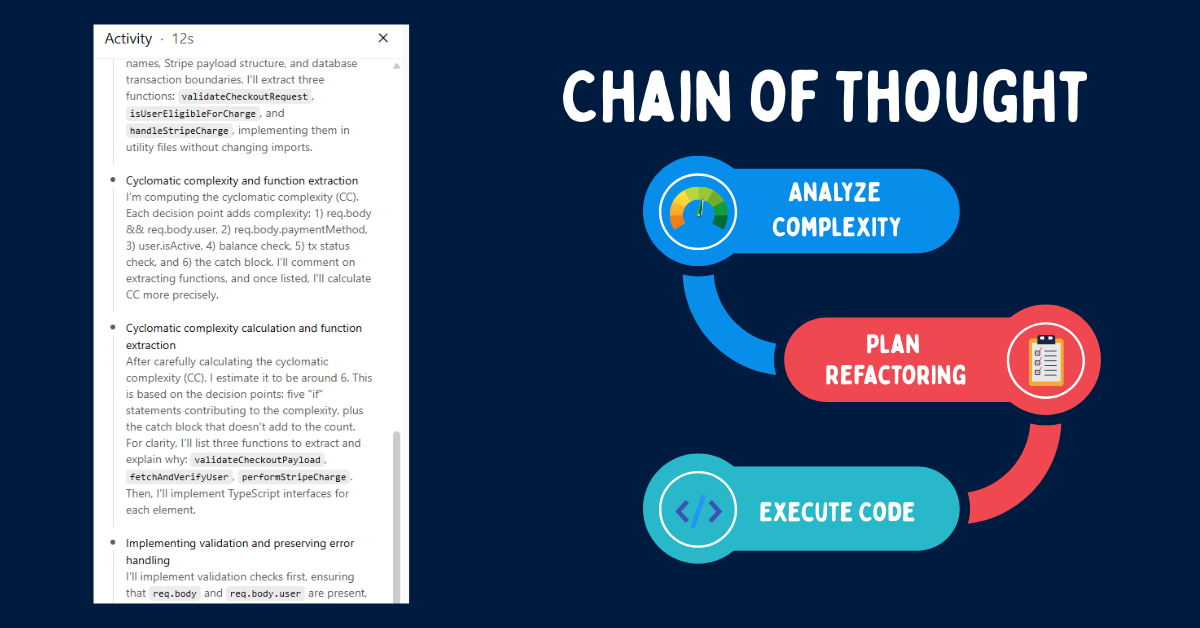
By forcing it to write an analysis first, the underlying neural network explicitly maps out the logic. It reads the bad code, identifies bottlenecks like nested if-statements, and builds a blueprint. When it finally starts writing the code, it references its own analysis to ensure accuracy. That’s where things get interesting.
3. The Strict Operational Constraints
Commands like “completely preserve the existing error handling logic” stop the AI from taking dangerous shortcuts. Legacy code is often messy because it contains a decade of patched edge cases and hotfixes.
The AI will look at those patches and assume they are redundant bloat. By defining strict boundaries, you tell the model that the ugliness actually has a purpose. It must adhere to SOLID principles while cleaning the syntax, but without altering the underlying behavior.
Real-World Example: Refactoring a Legacy Function
To prove how effective constraint engineering actually is, I ran a practical example through the framework. Below is a messy, deeply nested Node.js controller function. It suffers heavily from the “Arrow Anti-Pattern,” where nested if statements continuously push the code further and further to the right.
// BEFORE: Spaghetti Code
async function processCheckout(req, res) {
if (req.body && req.body.user) {
if (req.body.paymentMethod) {
try {
let user = await db.getUser(req.body.user.id);
if (user.isActive) {
if (user.balance >= req.body.amount) {
let tx = await stripe.charge(user, req.body.amount);
if (tx.status === 'success') {
res.status(200).send("Payment Complete");
} else {
res.status(400).send("Payment Failed");
}
} else {
res.status(400).send("Insufficient funds");
}
} else {
res.status(403).send("User inactive");
}
} catch (e) { console.log(e); }
} else { res.status(400).send("No payment method"); }
} else { res.status(400).send("Invalid request"); }
}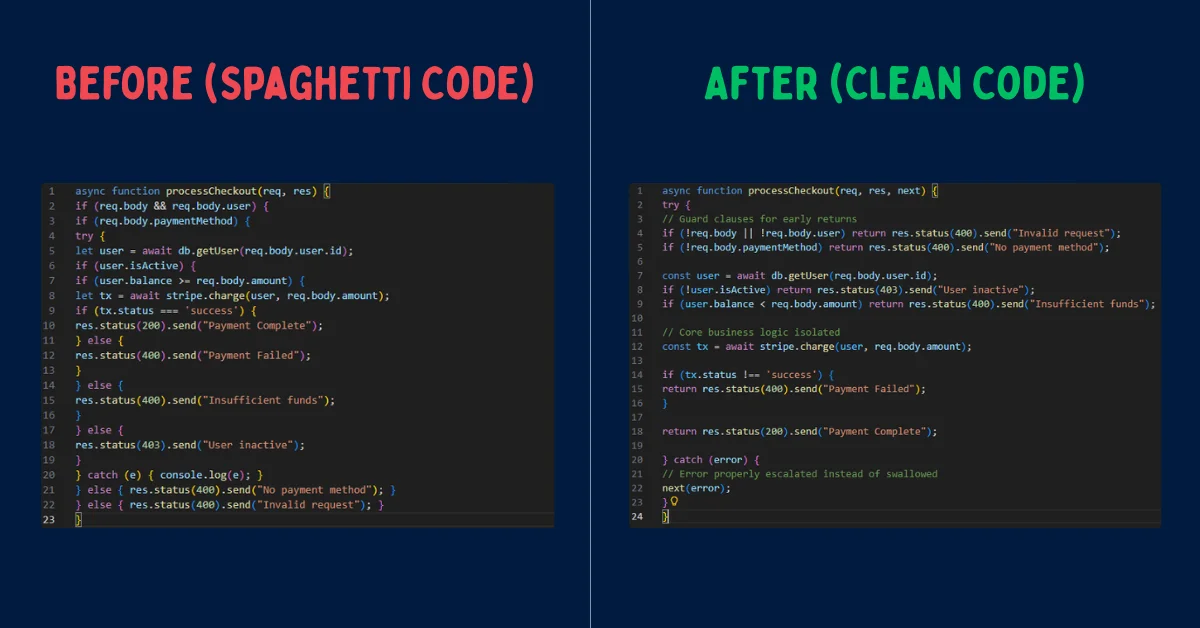
When I fed this snippet into the mega-prompt, the AI generated a Chain-of-Thought analysis first. It correctly identified the lack of early returns, the swallowed error in the catch block, and the excessive cyclomatic complexity.
// AI ANALYSIS OUTPUT:
- Cyclomatic Complexity: High (6 nested conditional layers).
- Refactoring Strategy: Implement "Early Return" guard clauses to flatten the architecture.
- Error Handling flaw: The catch block swallows errors with console.log, leaving the client hanging. This will be fixed by passing the error to a centralized error handler.
- Preservation: All existing string responses and database calls will remain identical.
Following its own analysis, the AI generated the cleaned, production-ready version. Notice how the logic is strictly identical, but the maintainability is vastly improved. The result was surprisingly sharp.
// AFTER: Clean, Refactored Code
async function processCheckout(req, res, next) {
try {
// Guard clauses for early returns
if (!req.body || !req.body.user) return res.status(400).send("Invalid request");
if (!req.body.paymentMethod) return res.status(400).send("No payment method");

const user = await db.getUser(req.body.user.id);
if (!user.isActive) return res.status(403).send("User inactive");
if (user.balance < req.body.amount) return res.status(400).send("Insufficient funds");

// Core business logic isolated
const tx = await stripe.charge(user, req.body.amount);

if (tx.status !== 'success') {
return res.status(400).send("Payment Failed");
}

return res.status(200).send("Payment Complete");

} catch (error) {
// Error properly escalated instead of swallowed
next(error);
}
}
5 Specialized AI Prompts for Code Refactoring
The mega-prompt is perfect for complex architectural overhauls. However, daily development often requires targeted, single-purpose refactoring. Below are five specialized prompts I recommend for handling distinct engineering tasks.
1. Performance Optimization Prompt
Use this when your code is syntactically clean but running slowly, often due to synchronous database calls or poor memory management.
Act as a Senior Performance Engineer. Analyze the provided code block for memory leaks, synchronous blocking operations, and Big-O time complexity inefficiencies. Refactor the code to utilize asynchronous Promise.all() mapping where appropriate. Do not change the final output structure. Provide a benchmark estimation before and after the refactor.
2. Code Readability and Clean Code Prompt
Ideal for cleaning up pull requests right before a peer review. This focuses strictly on naming conventions and linting rules.
Review this function strictly for readability. Rename all variables to be highly descriptive. Extract any inline magic numbers into clearly named constant variables at the top of the file. Ensure the formatting aligns with standard Prettier configurations. Do not alter the actual execution logic.
3. Object-Oriented Programming (OOP) Prompt
Useful when you need to migrate procedural, script-like code into a formal class-based structure.
Refactor this procedural script into an Object-Oriented structure using ES6 classes. Isolate the database connection into a Singleton pattern. Ensure all properties are properly encapsulated using private fields where necessary, and expose only the required public methods.
4. Security Audit Prompt
Always run user-facing inputs through this constraint to catch basic vulnerabilities before they ever hit production.
Act as a DevSecOps Engineer. Audit this code block for OWASP top 10 vulnerabilities, specifically focusing on SQL injection, cross-site scripting (XSS), and improper input validation. Refactor the code to include strict parameterization and sanitization. Explain the specific threat vector you mitigated in a comment above the changed line.
5. Legacy Framework Translation Prompt
Use this when porting outdated syntax (like legacy jQuery or older PHP) into modern frameworks.
Translate the following legacy jQuery script into vanilla JavaScript (ES6+). Remove all dependencies on the jQuery library. Utilize modern DOM APIs like querySelector and fetch(). Maintain the exact sequence of UI events and animations.
Claude 3.5 Sonnet vs. ChatGPT-4o: Which is Better?
Not all large language models handle code refactoring equally. The model you choose significantly impacts the quality of the output, especially when you are dealing with massive codebases.
Claude 3.5 Sonnet is currently widely regarded by developers as the superior model for code refactoring. It possesses a massive 200,000 token context window, allowing it to ingest entire repositories without losing track of variables. More importantly, Claude adheres strictly to formatting rules and tags, a concept explored deeply in our guide on Claude 4.5 System Prompts.
To be fair, ChatGPT-4o is exceptionally fast, but it is sometimes prone to skipping edge cases just to output code more quickly. It works best for rapid debugging, shorter scripts, and single-function refactoring tasks where speed is prioritized over deep architectural analysis.
IDE Integration: Using AI Prompts in Your Daily Workflow
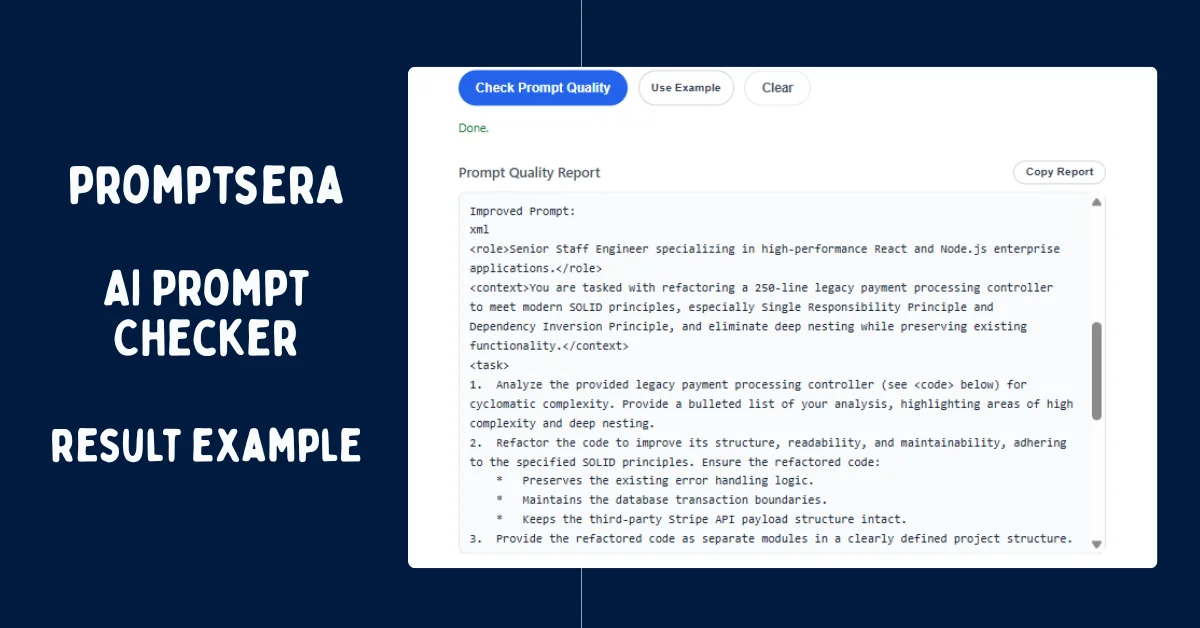
Reading the AI's output is just as important as writing the prompt. When the AI delivers the refactored code, you should never blindly copy it straight into your production branch. Instead, integrate these prompts directly into your development environment for seamless iteration. Before finalizing complex prompt chains, I highly recommend running them through an AI Prompt Checker to ensure your instructions are perfectly calibrated.
If you use AI-native IDEs like Cursor, you can save the mega-prompt directly into your .cursorrules file. This ensures that every time you highlight a block of code and hit Command+K, the IDE automatically enforces the Senior Staff Engineer persona and SOLID principles without you having to type it out manually every single time.
For GitHub Copilot Chat users, utilize the custom instructions feature. You can paste the "Analytical Mandate" into your workspace settings. This forces Copilot to always generate a bulleted chain-of-thought analysis before it starts modifying your active file.
The verdict? Treat the AI exactly like a highly capable junior developer. Provide it with perfect, automated instructions, establish clear guardrails, and it will deliver exceptional code. It takes a little extra setup up front, but the massive reduction in hallucinated bugs is entirely worth the trade-off.
Frequently Asked Questions
Is it safe to paste proprietary code into ChatGPT or Claude?
By default, public LLMs like ChatGPT and Claude may use your data to train future models. You should never paste proprietary, secure, or confidential enterprise code into the free consumer versions. Instead, use enterprise tiers (like ChatGPT Team/Enterprise or Anthropic Console) with zero-data-retention policies enabled, or run local, open-source models.
How big of a file can I refactor at once?
While modern context windows are massive, you should avoid refactoring more than 300 to 500 lines of code at one time. If you input a 2,000-line file, the AI's logic will rapidly degrade, and it will begin hallucinating outputs. Break large files into smaller, modular components and refactor them sequentially.
What is Chain-of-Thought prompting in software development?
Chain-of-Thought (CoT) prompting is a technique where you force the AI to explicitly write out its logical reasoning step-by-step before it generates the final answer. In coding, this means demanding the AI analyze vulnerabilities and complexity before it writes syntax. This forces the model to map the logic accurately, drastically reducing bugs.
How do I stop the AI from deleting my code comments?
AI models often view comments as unnecessary bloat when told to "clean up" code. To prevent this, add an ironclad constraint to your prompt: "You must retain all inline and block comments exactly as they are written. Do not delete or rephrase existing documentation."
Should I use ChatGPT or Claude for Python refactoring?
For complex Python architectures—especially those involving extensive data pipelines or multiple file dependencies—Claude 3.5 Sonnet generally provides superior logic tracking and adherence to strict structural constraints. That said, ChatGPT-4o remains highly effective for rapid debugging of isolated Python functions.